


The MacValley blog

Welcome to the MacValley blog, your first stop for all the latest MacValley news and views.
|
The MacValley blog Editor: Tom Briant
|
|

Sunday, December 29, 2013
Troubleshooting a problem with Flavours and PathFinder 6.x
I’ve enjoyed the Flavors app, allowing me to change the appearance of my Mac to an extent. It’s a lot of fun; but not every app loves it back. I found Pathfinder to be that one application.
After I set up Flavours and installed a theme or two, Pathfinder would not work correctly. The spinning beach ball of death sprang up.
After several attempts to fix this through repeated running of Fix Disk Permissions, which did no good; I finally remembered seeing an item under the Flavours menu.

That was the Troubleshooting…item on the menu, which led to the four item submenu of Exclude Applications, Clear Flavours cages, Reinstall help tool, and send diagnostics.
I clicked on Exclude Applications and got this window. The section you want, Hard Exclusions, lies at the bottom.

Click on the Select button and you can choose which app(s) to exclude:

As you see, I have already selected Path Finder as an excluded application. To add additional apps, just click on the Add button to bring up a standard file dialogue box. If you want to remove one, just click on the Remove button. Click on Close to end the selection.
Since I did these steps, Path Finder has not had problems.
Tom Briant
Editor, MacValley Blog


Senior Correspondent Arnold Woodworth's Weekend Wrapup
Former Apple Ad Exec Explains Why The New Christmas Ad Is Perfect
http://www.businessinsider.com/apple-ad-guy-christmas-ad-2013-12
http://kensegall.com/2013/12/apple-thinks-different-for-christmas/
Apple's iOS Completely Blew Away Google's Android For Shopping On Christmas
Maybe it's time to admit that Apple is doing the exact right thing with its iPhone business.
http://www.businessinsider.com/ios-android-shopping-2013-12
Futuristic Mac Pro Has Power to Spare
http://www.nytimes.com/2013/12/26/technology/personaltech/review-apples-new-mac-pro-computer.html
These Pictures Of Apple's First Employees Are Absolutely Wonderful
http://www.businessinsider.com/pictures-of-apples-first-employees-2013-12
The first iPhone was a miracle.
And yet, the iPhone experience we all enjoy today didn't happen overnight. It took years of Apple adding feature upon feature. By today's standards, the original iPhone was a useless brick.
As a reminder of how far the iPhone has come, we've put together this slideshow on how the first iPhone was pretty crappy.
http://www.businessinsider.com/the-first-iphone-2013-12
12 Things Samsung's Galaxy S4 Can Do That The iPhone 5S Can't
http://www.businessinsider.com/galaxy-s4-versus-iphone-5s-2013-12
Teens In The UK Are Calling It: Facebook Is Dead And Buried
16-18 year olds ...... mostly they feel embarrassed even to be associated with Facebook. Parents have worked out how to use the site and see it as a way for the family to remain connected. In response, the young are moving on to cooler things.
Instead, four new contenders for the crown have emerged: Twitter, Instagram, Snapchat and WhatsApp.
http://www.businessinsider.com/teens-in-the-uk-say-facebook-is-dead-2013-12
Oh Look, It's MySpace Reprised!
The author compares Facebook to MySpace, saying:
"anyone who forgets the similar meteor-shot of MySpace a number of years ago, and the subsequent crash, isn't very bright."
http://www.market-ticker.org/akcs-www?post=227093
Inside The Sleazy World Of Reputation Management, Where People Pay To Control What You See On The Internet
The crux of the work is to trick the search engines, mainly Google, into pushing bad news low in the search results while leaving good news (some of it maybe even fake) up high.
Counterintuitively, Google unintentionally helps the reputation management industry. Google keeps tweaking its search algorithm so that it always delivers the best results. Just when a reputation management company successfully buries a negative story under a bunch of spin, it often reappears again in the top search results. And the person must open the checkbook again.
http://www.businessinsider.com/reputation-management-2013-12
FINANCE PROFESSOR: Bitcoin Will Crash To $10 By Mid-2014
Since inception, Bitcoin has had a flawed DNA. It was dreamed up in a virtual world -- by computer geeks -- but was to be applied in the real world. To assume currency can be computer generated, run in a decentralized manner and outside of the central banking system and controls is farcical and economically dangerous.
In Bitcoin World it is not uncommon for prices to change by 20 or 30 percent in a given day, making Bitcoin toxic to economic growth.
I predict that Bitcoin will trade for under $10 a share by the first half of 2014.
http://www.businessinsider.com/williams-bitcoin-meltdown-10-2013-12
Bitcoin's Five (Big) Advantages Over Gold
http://moneymorning.com/2013/12/20/bitcoins-five-big-advantages-gold/
Overstock CEO On Bitcoins, Gold, Austrian Economics
http://www.zerohedge.com/news/2013-12-28/overstock-ceo-bitcoins-gold-austrian-economics-and-zombies
Thursday, December 26, 2013
Top 10 lessons for the new Mac user | Macworld
Top 10 lessons for the new Mac user | Macworld: ""
For you lucky people who got a new Mac for the holidays and now wonder what to do with it, let me point you to Chris Breen (of Macworld) who has 10 great lessons for the new owner.
Click on the link above and Read and watch these lessons before going any further.
Tom Briant
Editor, MacValley Blog
(Via.)
Wednesday, December 25, 2013
The Editor, who is the Geek Brother-in-law, with comments on getting a new Mac with OS X 10.9 and sharing your big iTunes library.
Good Morning! You’ve wondered all week about that big box with your name on it. Could it be your kin have decided to get your a new iMac?
If you answer “YES,” then have a mimosa to celebrate. Just one though, and don’t drink it near the new computer.
You have questions, I have answers
“What gives with this keyboard? Can’t I use my old keyboard?"
The Apple keyboard looks different from most, if not all, Windows keyboards. IF it’s not to your taste, you can use your old Windows keyboard.
You do need a USB connector on the end of the cable from the keyboard. I”ve gone over this topic here in this blog.
“How will I rip all my CD’s again? This Mac lacks a CD and DVD drive!"
If you ripped them to mp3 or m4a format, you’ll have no trouble. If you need to buy an external DVD drive after Christmas. you don’t need to buy Apple’s SuperDrive. Less expensive drives will work just fine.
STEP #1: Open a Finder window with your old music library folder
STEP #2: Open up iTunes
STEP #3: Click on the Library folder . Now Drag the folder from the Finder window to the iTunes Window. ITunes will make copies of them and put them into your music library.
“Help! i just got a beautiful new MacBook Air, but with only 256 GB SSD space. I have iTunes on my old Windows machine with a 60 Gb library. Can I share the library from the Windows machine to the MacBook Air?
The iTunes Home Sharing feature was meant for people like you.
Look at the very top left-hand corner of iTunes 11 for Windows. Click once on the downward facing triangle. A menu drops down.
The second item in the menu is Library. Click once on the rightward facing arrow.
You get a submenu with two items. Click on “Turn on Home Sharing…"

Now enter the e-mail address and password you set up when you set up your Apple ID when you set up your Mac or started buying music from iTunes.

You’re set to go on the Windows machine serving fresh hot music this Christmas Day!

Now on your Mac, go under the File menu and go down to Home Sharing.
Click on the rightward facing arrow to turn on Home Sharing


You may run into this problem if you have not previously authorized this copy of ITunes for access to the iTunes sore

Click on the Authorize button and you’re good to gol
Look in the Shared section of your iTunes Sidebar and you’ll see your shared libraries. As you can see, I have two Windows machines, (Windows XP and Windows 7) serving up music to my Mac. In turn, my Mac’s music library appears in the Sidebar of my Windows computer.


Here is the Mac’s Music Library being shared with the Windows computer.
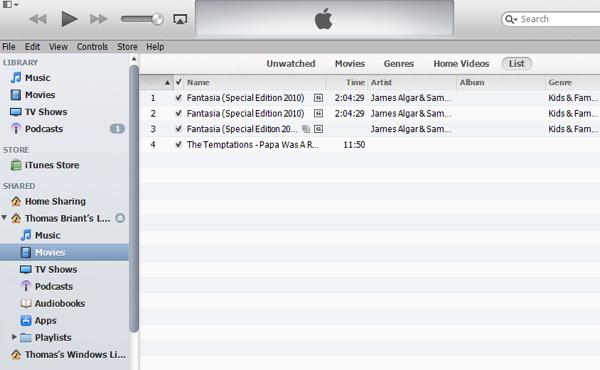
That’s all for now! Merry Christmas
Tom Briant
Editor, MacValley Blog
Tuesday, December 24, 2013
Quick guide: OS X Mavericks for Windows switchers | Computerworld Blogs
This is the link to a piece by Jonny Evans of Computerworld about switching from Windows to the Maqc and getting your first Mac
Christmas Day.
Tom Briant
Editor, MacValley Blog
Quick guide: OS X Mavericks for Windows switchers | Computerworld Blogs: ""
(Via.)
Monday, December 23, 2013
Integrating a Brand New Mac with 10.9 with an old Windows XP computer-It can be done with the Wormhole Switch
You’ve heard all the reasons for dumping Windows XP. Microsoft won’t support it after March 2014. Virus developers will try to exploit its vulnerabilities. It doesn’t support new technologies, like Thunderbolt and USB 3.0. It won’t support new software. And so on and so forth.
I thought about this and then I came up with reasons you might want to keep Windows XP on hand.
No, it won’t support the new hardware. Windows XP, however, supports several olderˆtechnologies, such as using the parallel port (remember that?) as an input for scanners and ZIP & SyQuest drives. You might have a serious investment in peripherals using the RS-232 serial port, such as computerized sewing machines. Sewing the sails for racing yachts. You’ve spent a lot of money on this stuff and expect to get many more years of service out of them before you have to scrap them.
Then the questions about software arise. You may use software.that runs fine on Windows XP, but will not run on Windows 7 or 8 no matter what you do. This is the software that connects to the above mentioned computerized sewing machines connected by serial cables. As for replacing the payroll software, hey, it works. “If it ain’t broke, don’t fix it,” comes to mind on these occasions.
You’d like to connect a brand new Mac to the old warhorse XP machine, but how to do it without making the XP machine more vulnerable to malware? How can I share text and graphics between the two machines? And you’d like to keep what remains of your sanity and not fuss with exotic configuration files.
I believe I have found the answer in the JUC400 Wormhole Switch. I have successfully configured it to work with a 2003 vintage Windows XP machine and my Mac Mini running 10.9.1. I have exchanged text and graphics via a shared clipboard and can drag files from one desktop to another. I did this over a USB 2.0 connection without a connection to the Internet.
The device cost me $39.95 at Fry’s Electronics, but you can get it at a better price now at Amazon, Tiger Direct, NewEgg, and B&H Photo.
Installation Problems and How I overcame them
So I set up my vintage Windows XP box with an appropriate 15” CRT VGA monitor to the immediate left of my Mac Mini and 23” Samsung monitor

I had previously used my Wormhole Switch with my Windows 7 box, which caused problems downgrading to a Windows XP machine. I resolved this problem by running the installation program for the latest driver. They had these programs for both Windows and Mac, but you only need to run one. The program upgrades the program held in flash memory in the housing. Just follow the on-screen directions.
I plugged one end into the XP box and the other end into a USB hub with my Mac Mini. It took a while, but finally everything synced up and I could move my cursor from one screen to another with both the Windows mouse and the Mac’s Magic Trackpad. I exchanged text and graphics clips via the clipboard and dragged files back and forth. You might want to keep an Ethernet connection between the two machines if you need a volume of files and folders between them.
Configuration of the Wormhole Switch
Once the connection between Windows XP and OS X 10.9 occurs, you only need to select which side the other machines lies on.
This is the Mac side. You click on the Wormhole icon to make it the foreground app. Then click on the left-most menu “Wormhole Switch” and set the position of the Windows PC.

This is the Windows XP preferences. You right-click on the Wormhole icon in the System Tray. Again you set the position of the other computer.

As you can see from the screenshots, you have more options you can set. You can choose to automatically go between desktops by moving your mouse to the edge of the screen or by setting a hot key.
Summary
For $40 or less, the JUC-400 Wormhole Switch provides a cross-platform melding of keyboard, pointing device, clipboards, and even the ability to drag a few files from desktop to desktop. It requires minimal configuration and no editing of configuration files (I’m looking at you Synergy) You may need to upgrade the programs stored in flash memory in the cable housing, but that’s a simple process.
It would be nice if it offered cross-plateform audio, too, but that’s a minor quibble.
If you need to integrate an older Windows XP machine (and its older user, too) with a brand new Mac running 10.9.1; then the JUC-400 Wormhole Switch provides an answer.
Note: When ordering make sure you get the JUC-400 cable and not another Wormhole switch. j5create makes several of these, some intended for Windows only and some for Windows and Android systems.
Tom Briant
Editor, MacValley Blog
Sunday, December 22, 2013
How to Troubleshoot the Four Most Common "Oh Sh*t" Mac Problems
A link to an article from lifehacker.com dealing with moment of aggravation with your Mac.
BTW, I highly recommend lifehacker.com. All kinds of ideas, from Macs to Windows to making breakfast burritos. Check it out.
Tom Briant
Editor, MacValley Blog
How to Troubleshoot the Four Most Common "Oh Sh*t" Mac Problems: ""
(Via.)
