


The MacValley blog

Welcome to the MacValley blog, your first stop for all the latest MacValley news and views.
|
The MacValley blog Editor: Tom Briant
|
|

Saturday, July 11, 2015


Senior Correspondent Arnold Woodworth's Weekly Web Wrap-up
What’s got them buzzing is not so much the scale of the building—a $5 billion glass-and-steel ring roughly the size of the Pentagon—but the exacting construction standards they are being asked to meet.
Apple Watch sales plunge 90%
Sales are far below expectations only three months after hitting shelves.
In an ambitious bid for the luxury market, Apple also unveiled a gold "Edition" model priced at $10,000 or more. So far, fewer than 2,000 of them have been sold in the U.S., Slice contends.
http://www.marketwatch.com/story/apple-watch-may-not-be-ticking-with-customers-2015-07-07
Andy Hargreaves from Pacific Crest wrote that "store visits, Google search volume, third-party data and recent supply checks all suggest demand for Apple Watch has fallen sharply from initial levels."
http://www.businessinsider.com/apple-watch-sales-estimates-2015-7
It’s fashionable these days to be critical of and predict doom for the Apple Watch.
AW comment: Apple has been a “doomed” company for the past 30 years. So say countless pundits.
It was easy to predict that Twitter would fail, when it first emerged. There was a lot of competition (ICQ, MSN Messenger, Orkut) and what the hell could you do with only 140 characters?!
Even looking back it is be hard to explain exactly why Twitter did work and became a worldwide phenomenon.
When I first made the leap from a traditional clamshell phone to an iPhone 3G, I knew I could never return to an iPhone-less life. The Apple Watch does not have the same effect.
http://www.businessinsider.com/apple-watch-review-i-can-totally-live-without-it-and-thats-very-bad-for-apple-2015-7
The current two-step system relies on two factors, but also included a third element for regaining access to an account: Recovery Key. The 14-character Recovery Key is generated during the two-step signup process and is meant as a backup. If you forget your password or lose access to all trusted devices and your phone number (but not both), the Recovery Key was the only way to restore your Apple ID account.
These twenty-something women figured out how to captivate millions of people every single morning
The women took a huge leap of faith and quit their jobs to start the daily email for your "smart friend."
http://www.businessinsider.com/the-skimms-danielle-weisberg-and-carly-zakin-interview-2015-7
Worldwide PC shipments saw their biggest drop in nearly two years, market researchers said this week, reaffirming the ascendancy of mobile and the steady demise of the personal computer.
5 things identity thieves don't want you to know
1) They paw through your trash. Buy a shredder and use it.
2) They can guess easy-to-remember passwords, and get into your financial accounts. Learn how to choose passwords wisely.
3) They might steal documents from your filing cabinets. Buy a safe and lock important documents in it.
4) They might open a new credit card account in your name. Obtain and review your credit reports.
5) Be very careful who you give your social security number to.
http://www.cbsnews.com/media/5-things-identity-thieves-dont-want-you-to-know/
Hacking Team (a surveillance tech firm) gets hacked
A company that sells software allowing governments to hack into computers has itself been hacked, and files posted late Sunday indicate it sold surveillance technology to dozens of countries, including Sudan, Egypt, Russia and the U.S.
The Italian company, Hacking Team, or HT S.r.l., is among a handful of companies that offer such surveillance tools to law enforcement around the world.
http://www.marketwatch.com/story/hacking-team-the-surveillance-tech-firm-gets-hacked-2015-07-06
Friday, July 10, 2015
Mini Reviews of Three Small Word Processors
Mini Reviews of Three Small Word Processors
I read a review by Bambi Brannan at Mac360 of a small word processor called TinyWord. I decided to check it out and compare it to two other small word processors.
I'll start with the TextEdit program that Apple includes with every OS X installation.
This picture shows you TextEdit. It is basic by nature and design. The toolbar across the top of the windows doesn't offer friendly icons to guide you.

You have to go into the Help to uncover where TextEdit's power lies.
Want to know how to set up a list that automatically increments from a non-zero number? Want to know how to set up a table with some merged cells? Well, you have to read the Help File.
It uses the multiple document interface with each document in a separate window. This works best for a few documents.
TextEdit does not show you a document's statistics, such as word count. If you search the Internet, you can find simple AppleScripts and free programs to add this feature. You'll want to advance to a more sophisticated writing tool if you need to write to a deadline or to a word count on a regular basis.
TextEdit uses the Alt/Option key to add extra features to menus, such as the Save As...option under the File Menu. Move your cursor out of TextEdit's windows, hold down the Alt/Option key, click on File to see Save As...
You can add graphics to it through the Insert menu and links to Web sites, too. If you look carefully under the Format menu; you can change a document to read-only, thus making it a template for the future.
TextEdit relies on the system-wide spelling and grammar features of OS X, which makes it better than many comparable Windows offerings. I'm sure, though, that you can see where you'd want to improve TextEdit. Many developers have done just that.
TinyWord 2.0, an improvement over TextEdit...but is it worth your $2?
TinyWord is an enhanced TextEdit. It offers a better organized toolbar with colorful icons that you can customize by right-clicking on the toolbar's blank areas. Functions that you would need to drill down into TextEdit's menus to find appear as separate icons on the toolbar. It even offers icons for Save and Save As.

Besides the toolbar icons, TinyWord offers a statistics windows which you can find under the View Menu. The keystroke to show statistics is Shift+G, but it didn't work under 10.10.4 You can also just click on the Get Info icon in the toolbar.

I found the help file scantier than that offered by Apple's TextEdit. It's a single 7-page PDF, but it contains a lot of information. If you want to create Word documents with floating graphics, you need to read why the Export function differs from Save As.
TinyWord relies on OS X"s system-wide grammar and spelling functions. No need to duplicate what Apple included that works well.
If you want to move up from plain TextEdit, TinyWord is a suitable candidate for consideration. It fleshes out the feature set with colorful icons, adds a couple of extra touches in a Statistics windows and Word export feature, and looks more inviting than TextEdit.
The price charged for TinyWord in the Mac App Store may prove the sticking point. Right now, TinyWord only costs $1.99. It used to cost $18.99. It's not worth $18.99 in my opinion.
Bean 3.2.5: Free, but no development any more
Bambi started off her article by praising Bean, a donation-ware simple word processor written by James Hoover. Mr. Hoover stopped development in 2013 because too many people stole his freely available source code without giving him credit or compensation. So you can still get Bean here. It still works under 10.10.4, but with no guarantee that it will continue to work in the future.
With that said, Bean remains many user's ideal of a simple dedicated word processor. Mr. Hoover didn't make it to write graduate theses on. In his Help file, he advises people with heavy duty word processing to get OpenOffice.

The template feature, though, sets Bean apart from TextEdit and TinyWord. Whereas TextEdit and TinyWord can save documents as read-only that you can use as static templates, Bean sets up a folder within the User Library dedicated to its templates. You can add dynamic text, such as time and date and ipsum lorem text that serves as a placeholder. Bean even provides the option of a signature line to automatically insert your name and title.
Bean doesn't use the Apple Help file format, choosing to use a single .rtfd file liberally illustrated and full of tips. It opens in a Bean window separate from the main text window.
So which one should I get?
TinyWord 2.0 offers a features and appearance upgrade from TextEdit. The colorful icons across the toolbar help neophyte users find the exact feature they want. The addition of the Get Info window, although with a non-functional shortcut key, helps those who have a word count requirement. The Export to Word feature improves the fidelity of Word documents.
On the negative side, if TextEdit didn't satisfy you with its feature set, then TinyWord won't satisfy you, either. The header and footer feature remains the same as TextEdit with no customization. The Help PDF file at best supplements the TextEdit Help File.
If you just want a word processor for writing single columns of text, like this article, then TinyWord fits the bill.
James Hoover's Bean 3.2.5 offers more features such as multiple columns, but suffers from the lack of development. You cannot be sure Bean will continue to work with each successive upgrade to OS X.
The single window as the focus of work with the choice of tabs, buttons or a sidebar to choose the particular document simplifies your writing when working with multiple documents in my opinion.
The template feature recommends itself to those needing to modify a standard document frequently, such as a resume or a school paper
Use Bean for the time being, emulate its interface in a word processor you develop, and have a Plan B for the inevitable day when it fails to open with the new version of OS X.
Tom Briant
Editor, MacValley Blog
The Editor States his opinions...you might agree with some
Hi, I’m Tom, the editor of this blog. I have written sporadically, but a few things changed in my life recently that will affect how I write.
First, I turned 60. The odometer of life turned to all zeros. I realized that I was not a kid of 21 anymore. I have often fancied myself a kid of 21, for 21 was an important year for me. I remember the Popular Electronics cover story about the Altair 8080 personal computer that came as a kit. I knew I would own a personal computer some day.
But now I’m 60. I have set opinions determined after some experience.
Second, don’t worry, I’m not engaging in political rants. Turn on your car radio if you want that. No, my rants will concern computers and how to get the most from them.
Third, I’m a writer first and foremost. Writers used to collect fancy pens; I collect various types of writing apps. I will write about them and how to wring the most of their features.
I listen to music, I love music (classical, jazz, and some rock), but I don’t write or play music. I also don’t intend to subscribe to Apple Music at this time. I have written about recording music on my Mac so I could move it to a CD or an external hard drive or iOS device for future enjoyment. Expect articles on that topic.
Same with graphics applications. I can’t paint or draw. My photography skills are limited, too. I can use screen captures and the Preview application to illustrate my articles. My graphics talent stops there.
If YOU, though, want to express your opinion on Apple Music and Garage Band and Logic Pro and the plethora of music software out there, I’d enjoy hearing from you. Submit a manuscript in 500 words or less in Rich Text Format (.rtf), Microsoft Word (.doc or .docx), Pages (.pages) or Plain Text (.txt). If I can read it, I’ll accept it at thomasbriant@me.com. I’ll edit it for grammar and spelling, then I’ll send it back to you for final approval.
The same goes for graphics applications and games. 500 words or less in a Mac-compatible format. If you want to include pictures, please include them as a separate attachment.
Fourth, I will write about Windows and Linux as well as Macs. If you work for a large organization, as I do, you’ll have to work with Windows. I have tried out the previews of Windows 10 and I think it’s definitely better than Windows 8.1. Having said that, I am certain that a cottage industry will flourish for improvements to Windows 10. For example, Windows 10 has an app menu; but for those demanding the Windows XP/7 Start Menu, you’ll need a 3rd party program.
As for Linux, I like it. I use derivatives from the Ubuntu version of Linux to meet my needs. I quintuple-boot between 3 versions of Linux, Windows 7, and Windows 10 Preview. I’m a mega-nerd.
I regard Linux as the garage bench for testing out ideas about operating systems that you’ll see in Windows and OS X in the future. For example, Linux has had app stores called “repositories” for years before OS X and Windows put them in. The interface lacked the slickness of the OS X and Windows App Stores; but you had a choice of numerous programs that someone had checked for malware before you tried them.
Fifth, I want my readers to take away something they can use to improve their experiences with the computer. I will assume that a lot of my readers regard the computer as promising, but somewhat alien. “How do I…?” comes to your minds.
I will assume that my readers have learned how to ride bicycles in their childhood. You started out with training wheels, you advanced beyond them, albeit with a few skinned knees and soon you expanded your range outward.
I have set as my goal of getting you back on the bicycle seat, so to speak, and giving you advice as to how to stay upright and moving forward.
Tom Briant
Editor, MacValley Blog
Thursday, July 9, 2015
How to Make a Bootable OS X El Capitan Beta USB Installer Drive
How to Make a Bootable OS X El Capitan Beta USB Installer Drive: ""
(Via.)
The instructions for making a USB installer from the 6 Gb installer you downloaded from Apple are at the link above.
Please note these instructions ASSUME you use the name “ElCapInstaller”
If you formatted your USB drive and left the name at, say, “UNTITLED”, this won’t work.
You’ll have to change the name of the installer in the Terminal command.
Tom Briant
Editor, MacValley Blog
Saturday, July 4, 2015
Senior Correspondent Arnold Woodworth's Weekly Web Wrap-up
It's possible the watch just isn't going to be a major product, at least not right away. It may take years of refinement before it really breaks out.
It could ensure transparent and fair elections in the developing world.
It could even help certain Central American countries, where reliable records are rare, track things like land ownership.
What is this technology?
It's called the blockchain, and it's the digital ledger that forms the backbone of bitcoin.
Some enthusiasts envision a world in which versions of the blockchain - or some other blockchain-inspired protocol, but built on a unique foundation - will become the universal protocol that underpins our entire financial system.
http://www.marketwatch.com/story/the-technology-behind-bitcoin-is-being-used-in-surprising-ways-2015-07-01
The FBI doesn’t know who or why. Yet.
http://www.businessinsider.com/california-internet-cables-in-underground-vault-cut-in-attack-2015-7
Security experts warn that any attempt to weaken encryption or introduce “back doors” for the authorities can have unintended and dangerous consequences. There’s no back door that can only be used by the good guys, they argue, and weakening the tech will put consumers at risk from criminals and hackers.
http://www.businessinsider.com/david-cameron-encryption-back-doors-iphone-whatsapp-2015-7
Friday, July 3, 2015
Xtrafinder versus Total Finder for the battle of Finder Enhancers
Three Types of Finder Enhancements.
As Mac users, we’ve all tried the built-in OS X Finder. We've wished for more features. Well, I've tried and collected several different types of Finder enhancements. They break down into three classes:
The first are the Finder plug-ins, apps meant to enhance the Finder itself.
The second are the ones that resemble the great MS-DOS program of the 1980s and 1990s, Norton Commander. Norton Commander is a text-based program that greatly improved the interface of MS-DOS. It is a piece of programming genius. No wonder programmers continue to borrow from it and to use the word “Commander” in naming their creations.
The third are the ones that start with the look of the OS X Finder and extend it in order to replace it.
The Finder Plug-Ins
I will write about Tran Ky Nam's XtraFinder, a donation-ware Finder plug-in; and Binary Age's TotalFinder, which costs $9 after a trial period. Both programs do not permanently alter the Finder. You have to turn on the program, or make it boot up at log-in, and you have the option to turn it off to go back to a plain vanilla Finder.
XtraFinder
On the surface, XtraFinder adds tabs to the Finder window and the ability to split a window into two halves. If you want to dig further into it, go under the Finder item down to the XtraFinder selection at the bottom. You can get to XtraFinder's extensive preferences, which let you add Cut and Paste to the Finder to begin with. You can also change the appearance of the Sidebar to add color to the icons and change the file panels' appearance to a dark background with light text.

You have two choices when it comes to handling side by side file panels. Command + U splits one file panel into two panes. Hit Command + U again and it returns to one pane. You only get the two vertical side by side panes with this command.

If you want two horizontal windows instead, go up to the Menu Bar to click on the XtraFinder icon. You will see options for two separate windows either side by side vertically or on top of each other horizontally.
XtraFinder adds the ability to have a new Finder window pop up with a keystroke. This is called a “Pinnable Window” By clicking on the pin icon in the upper left-hand corner, the window stays put on the screen.
You also have the sorting option of automatically placing folders at the top. You don't have to sort them manually.
XtraFinder adds features many users have clamored for since they first booted up OS X. If you want to repay Tran Ky Nam for his effort, purchase his text macro program Atext.
If you want to exit XtraFinder, click on the Menu Bar icon and select “Restaret Finder”. Finder will restart in plain vanilla mode.
TotalFinder
TotalFinder installs in the same way as XtraFinder; as a plugin for the Finder that you can switch off by restarting the Finder. Just go to the Total Finder icon in the Menu Bar and choose “Restart Finder”.
Okay, I've just described a free option for enhancing your Finder. Why should you pay $9 for TotalFinder?
For one thing, TotalFinder offers better documentation. Go to “About TotalFinder” in the credits and you'll see a link to the documentation which they maintain on their home Web site.
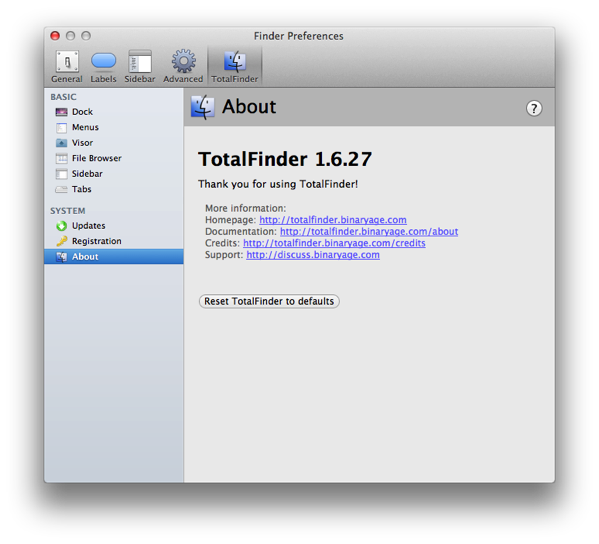
As for Dual Mode, I prefer Total Finder's Dual Mode, which you start with Command + U same as XtraFinder.
On the other hand, Total Finder doesn't offer a dual horizontal window mode, like XtraFinder
Total Finder offers a option similar to XtraFinder's Pinnable Window. It's called Visor and you have a Finder window that you can pull up in the middle of something else.
You have the option of colorful icons in the Sidebar.
You have the option of colorful labels, too. Total Finder adds back the labels that Apple took away from you.
All Right, which is the better one?
XtraFinder is free. You can't beat free.
On the other hand, Total Finder offers documentation and support. $9 is reasonable for that.
You can install both and compare them against each other to see if they meet your needs. They both offer uninstall options for dissatisfied customers.
It comes down to a matter of taste. Which one do you prefer? Which one can you afford?
Tom Briant
Editor, MacValley Blog
