


The MacValley blog

Welcome to the MacValley blog, your first stop for all the latest MacValley news and views.
|
The MacValley blog Editor: Tom Briant
|
|

Sunday, July 3, 2016
Senior Correspondent Arnold Woodworth's Weekly Web Wrap-up for Sunday, July 3, 2016
Video:
Want to see the latest progress at Apple’s new headquarters now under construction in Silicon Valley? One documentarian has you covered.
Matthew Roberts has published his latest video taken from a drone of Apple’s Campus 2 in Cupertino, Calif., including a peek at the main “spaceship” building as well as some of the others nearby.
http://fortune.com/2016/06/30/apple-spaceship-campus-flyover/
Video:
Take a Sneak Peek at Apple's Mindblowing $5 Billion Spaceship Campus
The Apple spaceship is finally looking like it’s almost ready to blast off.
http://gizmodo.com/here-s-a-sneak-peek-at-apple-s-mindblowing-5-billion-s-1782883483
7 clever tricks that will make your iPhone or iPad better
http://www.foxnews.com/tech/2016/07/02/7-clever-tricks-that-will-make-your-iphone-or-ipad-better.html
There will never be anything like the iPhone again
Nine years and a few days ago, Apple released the iPhone, and the world was never the same.
Well, there's some bad news and some good news.
The bad news is that we probably won't another big, world-shaking product introduction like the iPhone any time soon.
The good news is everybody's right! The next big thing is already here, and you probably haven't even noticed it yet.
the iPhone wasn't the first of a new kind of computer, it's the last of the old.
Just know that the arrow of history is pointing towards a whole galaxy of smart everything in constant communication. Where an iPhone is pretty good at lots of things, you're going to see more dedicated tools for specific tasks start to emerge, all powered by intelligence and connectivity.
http://www.techinsider.io/iphone-vs-virtual-reality-and-headphones-and-robotics-2016-7
10 facts about the Apple-1, the machine that made computing history
On June 29, 1975, Steve "Woz" Wozniak tested the first prototype of the Apple computer, and history was made.
http://www.cnet.com/news/apple-1-the-machine-that-made-computing-history/
The oldest library in the world just opened to the public — here's a look inside
1,157 years after it first opened, the world's oldest library has finally been restored and unveiled to the public.
Located in Fez, Morocco, the al-Qarawiyyin library is part of the world's oldest continually operating university, al-Qarawiyyin University, which opened in 859.
http://www.techinsider.io/inside-al-qarawiyyin-the-oldest-library-in-the-world-2016-6
Google's Satellite Map Gets a 700-Trillion-Pixel Makeover
The new map, which activates this week for all users of Google Maps and Google Earth, consists of orbital imagery that is newer, more detailed, and of higher contrast than the previous version.
Most importantly, this new map contains fewer clouds than before—only the second time Google has unveiled a “cloudless” map. Google had not updated its low- and medium-resolution satellite map in three years.
http://www.theatlantic.com/technology/archive/2016/06/google-maps-gets-a-satellite-makeover-mosaic-700-trillion/488939/
The internet does not just radicalize would-be terrorists, it radicalizes everybody.
This video starts off silent, until you click its volume control.
https://twitter.com/billmaher/status/747553266414718977
Powerful facial-recognition software can shred your privacy with just 1 photo
Nearly 250 million video surveillance cameras have been installed throughout the world, and chances are you’ve been seen by several of them today. Most people barely notice their presence anymore — on the streets, inside stores, and even within our homes. We accept the fact that we are constantly being recorded because we expect this to have virtually no impact on our lives. But this balance may soon be upended by advancements in facial recognition technology.
Soon anybody with a high-resolution camera and the right software will be able to determine your identity.
A new app called FindFace, recently released in Russia, gives us a glimpse into what this future might look like. Made by two 20-something entrepreneurs, FindFace allows anybody to snap a photo of a passerby and discover their real name — already with 70% reliability.
http://www.marketwatch.com/story/facial-recognition-will-soon-end-your-anonymity-2016-06-02
A hacker wants to sell 10 million patient records on a black market
These records are being sold in four separate batches. The biggest batch includes 9.3 million patient records stolen from a U.S. health insurance provider.
The three other batches cover a total of 655,000 patient records, from healthcare groups in Atlanta, Georgia, Farmington, Missouri, and another city in the Midwestern U.S. The hacker didn't give the names of the affected groups.
The hacker wants a total of 1,280 bitcoins for the data he stole.
Healthcare providers are seen as especially vulnerable to cyberattacks because they haven't invested as much in IT security, according to experts.
http://www.pcworld.com/article/3089086/a-hacker-wants-to-sell-10-million-patient-records-on-a-black-market.html
The hacker said in one listing that the data was stored on an "accessible internal network" and stored in plaintext -- which if true would be in violation of federal healthcare privacy rules.
http://www.zdnet.com/article/hacker-advertising-huge-health-insurance-database/
The best free weapon for businesses to fight phishing fraud
The organizational culture instinctively and intuitively gave employees all the tools to spot a phish. No technical tools, but the cultural human element allowed our close knit humans to immediately spot complex spear phish campaigns.
This close knit and well connected organization working culture was my best weapon to identify and defeat the phish campaign! And best of all it was already there - no purchase needed!
I discovered this weapon when other staff members in the organization forwarded phish emails into the information security office. The quality of the phish emails was very good. No spelling mistakes and excellent grammar. The wire instructions in the Business email compromise (BEC) phish emails were well laid out. The email had all the hallmarks of a professional spear phish. Yet my people were catching these phish emails very easily. The folks catching the phish and forwarding to me were not computer geeks but regular office staff with average skills in computing and security awareness. How were these folks able to spot these sophisticated spear phish and regular phish attacks?
The more I dug in I realized that while the malicious phish campaign had taken pains to craft a well-polished and targeted phish, they tripped up on some common details:
• The salutation was off. Somebody we refer to as William was named as a Bill in the email or the other way around. James in accounting was referred to as James in the email and not what we normally used, which was ‘Jim’
• The sender signature was incorrect in a similar manner; For example the phish email would say John Doe instead of simply John
• The style of the content was different. The wording of the content seemed different. The email was often very abrupt with no ‘please’ or in some cases no sender name in the message body.
http://www.csoonline.com/article/3086870/security/the-best-free-weapon-to-fight-phishing-fraud.html
Bart ransomware shows it can be effective without sophisticated encryption
In order to protect themselves against ransomware attacks, users should be wary of email attachments, especially those with unusual file extensions like JS. They should also keep their computer software up to date, especially their browsers and browser plug-ins, and they should implement a file backup routine that involves an offline or offsite backup location.
A new ransomware program making the rounds uses a simple, yet effective technique to make user files inaccessible: Locking them in password-protected ZIP archives.
The new threat is called Bart.
Bart stands out through its simplicity and efficiency, according to researchers from security vendor PhishMe.
Unfortunately for users, Bart is proof that attackers don't need advanced crypto knowledge or complex infrastructure to create reliable and effective ransomware programs. That's why this cybercrime model is so successful and why it won't go away anytime soon.
http://www.computerworld.com/article/3088912/security/bart-ransomware-shows-it-can-be-effective-without-sophisticated-encryption.html
Android’s full-disk encryption just got much weaker—here’s why
Unlike Apple's iOS, Android is vulnerable to several key-extraction techniques
A blog post revealed that, in stark contrast to the iPhone's iOS, Qualcomm-powered Android devices store the disk encryption keys in software. That leaves the keys vulnerable to a variety of attacks
http://arstechnica.com/security/2016/07/androids-full-disk-encryption-just-got-much-weaker-heres-why/
Video:
JOHN MCAFEE: This is why the US is losing the ‘cyber war’ to China and Russia
http://www.businessinsider.com/john-mcafee-china-russia-cyber-war-hackers-2016-5
Attackers are developing an aggressive new ransomware program for Windows machines that encrypts user files as well as the computer's master boot record (MBR), leaving devices unable to load the OS.
The program is dubbed Satana -- meaning "Satan" in Italian and Romanian ... functional but still under development.
http://www.computerworld.com/article/3090543/security/satana-ransomware-encrypts-user-files-and-master-boot-record.html
When Should Hacking Be Legal?
A group of academics and journalists say a federal computer-fraud law criminalizes their work.
When Aaron Swartz, a prominent programmer and digital activist, was arrested in 2011, he was halfway through a fellowship at Harvard’s Center for Ethics. Faced with the possibility of decades in prison and up to a million dollars in fines, Swartz took his own life in 2013.
The ordeal brought CFAA—a 30-year-old anti-hacking law that has been updated half a dozen times to keep up with new technology—under intense scrutiny.
Now, a group of academic researchers and journalists is suing the government, challenging the constitutionality of part of CFAA. With the help of the American Civil Liberties Union, they’re targeting the portion of the law that makes it illegal to break private companies’ terms of service, claiming that the rule violates researchers’ and journalists’ rights to conduct research and investigations in the public interest, as guaranteed by the First Amendment.
The four professors bringing the lawsuit are conducting research into racial and other discriminatory biases in online services.
http://www.theatlantic.com/technology/archive/2016/07/when-should-hacking-be-legal/489785/


Saturday, July 2, 2016
How to Sort your Finder's Display of Apps by Date Last Opened
I’ve read the advice in several articles that to improve your Mac’s performance, cut back on the number of installed apps.
So, how do you tell which apps you use frequently and which apps you haven’t touched in years? Can your Mac tell you?
Go to the Finder and open a window showing your apps. By default, the Finder shows them in alphabetical order.

To show them in order of apps last used, do the following:
- Change the Arrange by criteria from Name to Date Last Opened.


- Change the Sort by criteria from Name to Date last Opened.
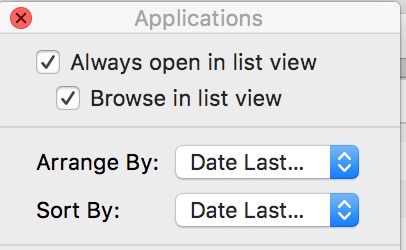
- Add another item column (Date Last Opened) by checking the box next to Date Last Opened.

Now your Finder window displays the Apps sorted by time and date last opened.

Now it’s up to you to decide which ones you keep and which ones you archive.
Tom Briant
Editor, MacValley Blog
Time to Start Backing up your Mac!
Hi, All. It’s the middle of the year. Have you set up a backup plan for your Mac/Windows/Linux box? if not, do so!
For your Mac, you need to set up Time Machine. Just go to Costco or Frys or Best Buy or Staples or Office Depot/Office Max or go on-line to Amazon or Newegg to get an external hard drive. Spend $100 for a 2 Terabyte portable drive.

That’s it! Just a small plastic box and a USB 3.0 cable. Just plug it into a USB 3.0 or 2.0 port on your Mac and go to Time Machine. It will walk you through setting it up and even formatting it in the Mac format. It probably came formatted for Windows.
But make those backups! How much would it cost you to recreate (if possible) all those files you spent the past 10 to 20 years working on at $20/hour? See, it pays to get a backup drive and dedicate it to specifically backing up your Mac!
(thanks to DX.com for the use of their Western Digital Elements picture)
Tom Briant
Editor, MacValley Blog
Sunday, June 26, 2016
Senior Correspondent Arnold Woodworth's Weekly Web Wrap-up for Sunday June 26, 2016
Until now, users wanting to display NASA's app on their TV had to cast it through Apple's remote streaming software, AirPlay, or a similar service. But now, Apple TV owners can call up the app without having to send it through an iPad or iPhone.
Leaving the kernel unencrypted is a rare move of transparency for Apple.
China revealed its latest supercomputer, a monolithic system with 10.65 million compute cores built entirely with Chinese microprocessors. This follows a U.S. government decision last year to deny China access to Intel's fastest microprocessors.
There is no U.S.-made system that comes close to the performance of China's new system, the Sunway TaihuLight. Its theoretical peak performance is 124.5 petaflops, according to the latest biannual release today of the world's Top500 supercomputers.
The fastest U.S. supercomputer, number 3 on the Top500 list, is the Titan, a Cray supercomputer at U.S. Dept. of Energy's Oak Ridge National Laboratory with a theoretical peak of about 27 petaflops.
China now has more supercomputers in the Top500 list than the U.S., said Dongarra. "China has 167 systems on the June 2016 Top500 list compared to 165 systems in the U.S," he said, in an email. Ten years ago, China had 10 systems on the list.
http://www.computerworld.com/article/3085483/high-performance-computing/china-builds-world-s-fastest-supercomputer-without-u-s-chips.html
If you thought Intel's 72-core Xeon Phi supercomputing chip had a lot of cores, think again. Researchers at the University of California-Davis designed a processor with 1,000 cores.
The team partnered with IBM to fabricate its design, called KiloCore. Each of the processor cores is individually clocked, so it can run—and shut down—independently of the others. That independence is crucial to managing the processor's power demands, enabling high throughput with relatively lower energy use.
http://www.pcmag.com/news/345433/worlds-first-1-000-core-cpu-runs-on-aa-battery
In an impressive display of one-upmanship, UC Davis has created a monster of a chip, called “KiloCore,” which houses 1,000 independent processors. After a bit of math, that comes out to a maximum computation rate of 1.78 trillion instructions per second. Holy shit.
But arguably the more impressive feat is how UC Davis was able to make such a monster chip actually energy efficient. According to UC Davis, the chip can perform 115 billion instructions per second and only give off .7 Watts
http://gizmodo.com/new-kilocore-chip-is-the-worlds-first-with-1-000-proc-1782305737
Scientists and archaeologists have long known that the Antikythera Mechanism — a device that was discovered in an ancient shipwreck near Crete in 1901 — was astonishingly ahead of its time when it was built nearly 2,100 years ago. However, there was one thing no one had been able to figure out — what exactly was this contraption, made of several large gears and cogs, used for?
Until now.
Scientists have come to the conclusion that the device was used for both astronomical and astrological purposes.
the Antikythera Mechanism, often called the world’s first analog computer, was, in addition to pinpoint the positions of sun, stars and the moon, used to predict solar and lunar eclipses — events ancient Greeks believed could impact human affairs.
“The Antikythera mechanism simulated a Hellenistic cosmology in which astronomy, meteorology and astral divination were intertwined,” the researchers said.
http://www.ibtimes.com/antikythera-mechanism-mysteries-2100-year-old-computer-revealed-after-decade-long-2381170
poor mom or dad doesn’t understand one of the cardinal rules of texting, which is that you don’t use periods, period. Not unless you want to come off as cold, angry or passive-aggressive.
The period is no longer how adolescents finish their sentences. In texts and online chats, it has been replaced by the simple line break.
You just hit send
Your words end up on a new line
a visual indication
that you have started
a new sentence,
https://www.washingtonpost.com/news/wonk/wp/2016/06/13/stop-using-periods-period-2/
The rise of cordcutting is hastening the end of free, over-the-air broadcast TV. Why? In part because those consumers who have abandoned traditional pay-TV service for online alternatives are threatening to cut into the massive licensing fees broadcasters now rely on to support their business.
With too little money to be made from free TV, the era of on-the-air (OTA) television is beginning to wind down. No wonder so many broadcasters are selling their spectrum back to the government.
http://www.lightreading.com/video/ip-video/free-tvs-decline-has-begun/a/d-id/724237
San Francisco in the twenty-first century is the town that STEM built.
the district's new mathematical course sequence, students would not be introduced to the joys of polynomials until high school.
many parents see the district's new standards as a dumbing down of the curriculum.
In fact, the evidence on early algebra is decidedly mixed.
http://www.businessinsider.com/why-san-francisco-stopped-teaching-algebra-in-middle-school-2016-6
Android users beware: a new type of malware has been found in legitimate-looking apps that can “root” your phone and secretly install unwanted programs.
The malware, dubbed Godless, has been found lurking on app stores including Google Play, and it targets devices running Android 5.1 (Lollipop) and earlier, which accounts for more than 90 percent of Android devices.
Some apps are clean but have a corresponding malicious version that shares the same developer certificate. The danger there is that users install the clean app but are then upgraded to the malicious version without them knowing.
http://www.computerworld.com/article/3087003/security/new-android-malware-can-secretly-root-your-phone-and-install-programs.html
a member of the IT team at German payments processor Computop retrieved an email sent to one of the company's public addresses threatening to hit the firm's customer websites with a massive DDoS attack if a ransom of 15 Bitcoins (about £7,900) was not paid to the attackers by June 15.
The attackers had launched a smaller demo DDoS to prove their intent.
Instead of simply ordering his company to defend itself in conventional fashion he was going to write to all 5,000 of Computop's customers and partners telling them that on 15 June his firm's website was likely to be hit with a DDoS attack big enough to cause everyone serious problems.
Gladis probably didn't consider it at the time but he was making history. Companies hit by or threatened with DDoS attacks rarely talk about their experiences and absolutely never put such information into the public domain prior to an attack. It just isn't done. Business wisdom says that it's just too much of a reputational risk and might even seriously annoy the attackers. It's almost as if the industry sees the attack as being the victim's fault.
Gladys let their merchants know, in advance, of the forthcoming DDoS attack. A lot of large retailers came back saying that they liked being given a heads up. Nobody complained.
Did the plan work?
The date and time for the promised attack came and went and nothing happend. Gladis was told by the company's pen-testers that the attackers would have been able to detect that the vulnerable servers were now within a mitigation cloud and probably simply backed off.
Computop's story stands as a remarkable refutation to the idea that security is best served by secrecy.
http://www.csoonline.com/article/3085159/data-breach/the-story-of-a-ddos-extortion-attack-how-one-company-decided-to-take-a-stand.html
Thursday, June 23, 2016
Monday, June 20, 2016
Using Windows Keyboard with OS X
If you’ve acquired a Macintosh, congratulations and welcome to the club. You’ll want to put your own personal stamp on it and this is an article to show how to use an external Windows keyboard with that Mac.
Apple does sell keyboards and many people like to buy them so that everything matches esthetically. Electrically, though, not much distinguishes an Apple keyboard you buy at the Apple Store from a generic Windows keyboard you buy at Frys or Best Buy or even at the 24-hour CVS or Rite-Aid’s office supply aisle. The keyboard use the same USB connectors to plug into the computer and they use the same key codes to tell the operating system that you’ve pressed a particular letter, number or symbol.
One nice feature that I’ve found is that the media control keys lying above the function keys for play/pause, go back a track, go forward a track, increase volume, decrease volume. work just fine with iTunes 12. A nice added feature.
Now to the main questions:
1. Where did the Command key go? The answer is that the Command key on a Mac keyboard and the Windows key on a PC keyboard serve the same function and use the same key code. If you own a Mac Mini as I do, Apple’s documentation tells you so.
So you can mentally remember to substitute the Windows key for the Command key.

If you prefer to use Apple’s keyboard layout, simply go to the Keyboard Preference Pane in System Preferences

click on it, and select Modifier Keys in the lower right-hand corner.

This panel drops down to show you the four modifier keys. Click on the double-headed arrow at the right-hand end of each box to make a selection from four choices. The choices are the same for each of the modifier keys.


So to make your Windows keyboard use the same layout for modifier keys as a Mac keyboard, change the Option key to the Command key and the Command key to the Option key.
Leave the Control key and Caps Lock keys alone.

Why doesn’t my Windows keypad work with my Mac?
I encountered that problem, too. It drove me crazy. I even substituted an old Mac keyboard with keypad and it still wouldn’t work! What is wrong?
The answer was simple and free. You can’t use Mouse Keys with your keypad and enter numbers from it, too.
Fine. So where do I turn off Mouse Keys?!
You go to the Accessibility Preference Pane

click on it, and select Mouse and Trackpad from the window on the left-hand side. You may have to move the window to see Mouse and Trackpad.

Now you see in the illustration above that Mouse Keys is turned on. TURN IT OFF TO USE THE KEYPAD TO ENTER NUMBERS!

You’ll hear several clicks when you turn Mouse Keys on or off. That verifies your choice.
I want to give thanks to OS X Daily for this tip here.
What if I want to further customize my Windows keyboard?
You can customize your Windows keyboard with changes to the Shortcuts.

Here you see my shortcuts for the Screenshots. You can see that I changed Copy Picture of Screen to the Clipboard from the standard Control+Shift-Command+3 to just F13.
F13 is called the Print Screen (PrtScr) key on a Windows keyboard. I wrote up instructions on how to change it herhttp://macvalley.blogspot.com/2015/12/tech-tips-for-new-mac-users-from-david.htmle.
That’s all for tonight. Look up the Karabiner app here for further ways to customize your keyboard.
Tom Briant
Editor, Macvalley Blog
Sunday, June 19, 2016
Hot Weather Advice for Computer Owners
Hot weather doesn’t agree with computers. My Mac didn’t want to work for me, so I did the following.
1. I pressed the On/Off switch to turn it off;.
2. I set a kitchen timer for an hour.
3. I looked at what peripherals I kept plugged into it.
4. I unplugged the unneeded peripherals from the USB ports.
5. I made sure to plug in a wired keyboard and mouse/trackball.
6. I turned on the Mac again after the timer went off. This time it worked. It just needed a nap.
So if it’s over 100 degrees where you live and your computer stopped working, just do what I did above.
Make sure your computer and peripherals stay in a relatively cool place. Not in direct sunshine.
Tom Briant
Editor, MacValley Blog
