


The MacValley blog

Welcome to the MacValley blog, your first stop for all the latest MacValley news and views.
|
The MacValley blog Editor: Tom Briant
|
|

Monday, July 2, 2018
One Journey with Apple ends, another journey begins
I do not plan to install macOS 10.14 before it reaches its third update. That should take place in the spring of 2019.
I come to this decision because:
1. My Mac mini won’t run 10.14.
2. I have more important financial needs than a new Mac computer.
3. Some software I depend upon only comes in the 32-bit variety. I don’t know if or when it will receive an update. 10.14 won’t like 32-bit software from what I’ve read.
I plan to devote this column to wringing the most from the system I use now. macOS 10.13 is not dead. Heck, I still have a 2006 white MacBook running OS X 10.6. It still runs.
Will I ever get another Mac? First, I have to pay my car off. Second, I want to see if Apple does start making Macs with Apple designed processors. They have shown a willingness to design and use their own processors and supporting hardware for the iPhone. The latest Mac, the iMac Pro, uses an Apple designed chip to consolidate several functions into one piece of silicon.
I must wait for the events to unfold. Til then, stick with what I own.
I’ll introduce you to software complementing Apple’s Aqua interface. I’ll introduce you to software allowing you to recycle your old college papers you wrote with a forgotten word processor in a now archaic file format and use them with contemporary software.
I’ll introduce you to Linux, specifically Ubuntu Linux and several of its derivatives. Ubuntu Linux works well with macOS. Ubuntu Linux allows you to recycle old PC hardware, even old Mac hardware.
You can “mod” Ubuntu Linux to resemble a wide variety of desktops, including macOS and Windows. You will find a wide variety of desktops you can easily bolt onto an existing installation.
Linux is not the Wild West of ‘80s computing, when every computer used its own processor and operating system and disk file format. I’ll show you the rules for running Linux to get your started. You won’t abandon your Mac, you’ll complement it.
Now let me return to the Mac. My first tip for getting the most from your Mac is: BACK IT UP REGULARLY!
If your Mac sits on a table between sessions and you keep it plugged into a wall socket, get a backup drive!
The rules for backups are simple: For those still running 10.4 or below, use cloning software such as Super-Duper to back it up regularly. Just set it up once a week before you go to bed to run overnight.
If you run 10.5 or above, use Time Machine! Plug in a USB hard drive with more capacity than your internal hard drive. macOS will ask you if you want to set up Time Machine. Let it guide you through the process of setting up regular backups.
Don’t delay! Hard drives are built on the same principles as washing machines. Do you trust your washing machine to always function? Or do you have a back-up plan involving a roll of quarters and a trip to the laundromat? Same logic applies to your hard drives. Have a back-up plan to take care of contingencies.
Tom Briant
Editor, MacValley Blog


Saturday, June 9, 2018
Senior Correspondent Arnold Woodworth's Weekly Web Wrap for Friday 6-8-2018
Intel processors, on the other hand, represented where Jobs wanted to take Apple.
https://www.cultofmac.com/484394/apple-intel-over-powerpc/
The Sonos Beam is designed for longevity. Including all three major virtual assistants is a nice touch too.
About one in eight Mac owners still runs OS X 10.11, which may only get one more update before gertting bumped off the support list.
Sorry Mac users, but you're not a high priority for Apple these days.
An open letter to Apple’s digital assistant.
But you’ve been stuck in infancy, while Amazon and Google take your birthright.
The Kremlin issued the decree after the messaging app would not provide decryption keys to let Russian authorities snoop on what users were talking about -- seven percent of Telegram's 200 million users are in Russia, around 14 million people. Telegram decided user privacy was more important than kowtowing to Russia.
“The person on the other line said, ‘unplug your Alexa devices right now, you’re being hacked,’” Danielle said.
Saturday, May 26, 2018
Revive Office 2008 in macOS 10.13 through Virtualization!
Office 2008 for Mac solved your office software problems. You could write using Word, create spreadsheets using Excel, and make presentations using Powerpoint. Now it won’t work on the latest version of macOS, 10.13.
What if you could revive your favorite version of Office for Mac within the current operating system? I have and I’m going to show you in just a minute.
First, what is the problem? Apple adds and sheds new features to its Macs with each new version. When those features don’t increase the benefits to you, that’s the problem. When it costs you substantially to replace the version of Office working for you with a newer one just so that you can continue to use your files with your Mac…that’s a bug, not a feature.
Virtualization of older version of macOS under the new one solves the problem. As Jason Snell pointed out in a recent Macworld article, the software exists to do this for consumers. I’m just taking it a step further.
What does it mean to “virtualize an operating system”? It means to run a guest operating system from a special app running under your host operating system. Several files serve the purpose of a hard drive or SSD for the guest operating system.
What do I need to achieve this goal?
You’ll need the following:
1. An Intel 64-bit Mac with at least 2 Gb of RAM per virtualized operating system and preferably 4 Gb. If you just have 4 Gb of RAM memory soldered to the motherboard, you can only virtualize 1 operating system besides your main operating system. If you can increase your RAM by swapping in higher capacity sticks of RAM, do so! The more, the better.
2. Enough hard disk/SSD storage space for the virtualized operating systems files and any apps you want to install.
3. One CPU core per operating system. If you have a dual core i5, you can virtualize 1. If you have a quad core i5, you can virtualize 3.
4. The downloaded operating system you want to virtualize. For macOS, you can download past versions you have installed previously through the Mac App Store.
5. An external USB DVD drive if your current Mac lacks a DVD drive and the software you want to install comes on a DVD/CD. It costs about $25 at Frys or through Amazon.
If you don’t have a copy of the operating system, then you’ll need to talk to your fellow Mac enthusiasts for a copy of it. You can’t legally sell a copy of macOS. At most you could ask for compensation for the cost of the storage media, such as flash drive.
Be discrete and for Heaven’s sake, don’t download from a sketchy Web site. You’re just asking to load up your Mac with malware!
Finally, you’ll need virtualization software. Jason Snell suggested, which I second, Parallels Desktop for Mac. It’s $80 if you haven’t bought it before, $50 if you have. You can virtualize many Intel/AMD based operating systems such as macOS, various flavors of Linux, and Windows.
Parallels makes it easy to install new operating systems.
What are my free virtualization options?
If you balked at paying $80 for virtualization software, I have a suggestion for you. That suggestion is Parallels Desktop Lite.
Parallels hasn’t publicized Parallels Desktop Lite. You get it from the Mac App Store. When you set it up, it gives you a choice. Either you can buy the option allowing you to install Windows and receive paid support for a year; or you can just virtualize Linux and macOS for free without paid support.

Deciding to virtualize only Linux and macOS saves you the $80. If you decide to virtualize Windows-any version of Windows, even your old Windows XP install DVD…you can do so and expect to pay Parallels for the privilege.
Installing the virtualization software, operating system, and desired application.
I will warn you right now that several parts of this process will take time. During those periods, you have to wait. Patiently. I would suggest downloading operating systems during work hours or performing other activities.
Step 1: Go to the Mac App Store to select and install Parallels Desktop Lite.
Step 2: Wait for the App Store to install it on your Mac
Step 3: Download the older version of macOS you want to virtualize.
Step 4: Install it. You may have to convert this older operating system from an App into an .iso installer file. I’ll go into that later.
Step 5: Install the older software you wish to revive.
Step 6: You’re in business!
Installing Parallels Desktop Lite
You install Parallels Desktop Lite by going to the App Store through the icon in your dock.

In the search window, enter “parallels desktop lite” Select it and the automatic installation begins. Watch the installation’s progress as a progress bar under the Launchpad window.
A window displaying the app appears. It is free, although it comes with an in-app option for a $59.99 1-year subscription. This subscription enables you to run Windows and receive paid support.
I’m going with the free Linux and macOS only with no paid support option.
Installing macOS
You need to obtain your own copy of the desired macOS version. I experimented with 10.8 and 10.10. I found it easier to install 10.10 than 10.8. I’ll explain.
Parallels Desktop Lite automatically converted the 10.10 installer app into an installation file. Installing 10.8 took more work. I needed to convert 10.8’s installer into an .iso installation file. I tried this procedure on two different Macs with success. I’ll explain how to do this at the end.

The procedure for both versions took time to complete. You need patience. You see the same screens you see when you install on a standard Mac.
A word of caution. If your host Mac has only 4 GB of soldered-in RAM, like my MacBook Air does, DO NOT allow Parallels Desktop Lite to lower the memory from 2048 MB! You need at least 2 GB of memory for the guest macOS to run at all.
Installation took about an hour, including the conversion of files and finishing details.
After installation finished, I installed and set up the Parallels Shared Folders. This gives you access to the set of folders on your host Mac you want.
To install Parallels Tools from which you set up the Shared Folders, nudge your cursor to the top of the screen. You want to see the menu for the guest OS set up by Parallels.
You want the Actions menu. Go down to the bottom and select “Install Parallels Tools"

Parallels Tools 
Parallels Tools is another disk image that looks like a generic hard drive icon with two parallel red lines.
Click on it to open.
Within it you see two icons. One is a gear to install the tools. The other is a trash can to uninstall Parallels Tools.
Click on the gear. Follow the on-screen instructions. When asked to, enter your guest OS user password.
When the installation finishes, reboot your guest OS. The installer will do it automatically if you don’t do it first.
You’ll see a network folder icon appear on your guest OS’ desktop. It’s marked Parallels Shared Folders.

One more thing…you need to define the host OS’ folders to connect to.
Now nudge your pointer up to the top of the guest OS’ desktop to make the host OS’ menu appear. This time you want the Actions
Menu.
Go to Sharing.
From the Sharing submenu, go to Add A Folder...
My suggestion is to add your /Users/<host user name> folder. Your main User folder. Click on the “OK"
Button and your Shared Folders are set up.

Installing the desired app(s)
With installation of macOS as a guest OS, I proceeded to install the app. I installed Office 2008 with macOS 10.10 and Office 2011 with macOS 10.8.
I want to warn you about Office 2011. Microsoft has imposed a limit on activations. You can only install it so many times before Microsoft refuses to activate it. They believe you must be a pirate! So exercise good judgement when installing Office 2011.
Connecting the DVD with Office 2008 and the flash drive with Office 2011 took a little effort. You want to use Parallels Desktop Lite’s menu, which you access by pushing your mouse/pointing device’s cursor to the top. You want to use the Devices menu to connect the physical media to the virtual machine.
If you can’t get the DVD/CD drive to appear on the Desktop, go to the Devices menu in Parallels. At the bottom you’ll see the Configure… menu choice. Select it.


In the Parallels Configuration screen, click on CD/DVD. In the source box to the right, choose the physical DVD drive. That should force Parallels to recognize your DVD drive and make the installation DVD appear on your Desktop.
Click on the DVD icon and click on the installer. Follow the on-screen instructions and enter the software key when requested. You’re back in business!
Running an update caused problems. The Automatic Update app wouldn’t work under a virtual machine. I downloaded the updaters manually to install. Safari on the guest OS could get to Microsoft.
Printing needed preparation.
You need to go to your host Mac’s Printer and Scanner preference pane. Make sure you set up the printer you want to use with the guest OS as a shared printer. You’ll set up a tiny network right on your own Mac. You’ll need to go back to your guest OS to set up the printer through its Print and Scan preference pane.
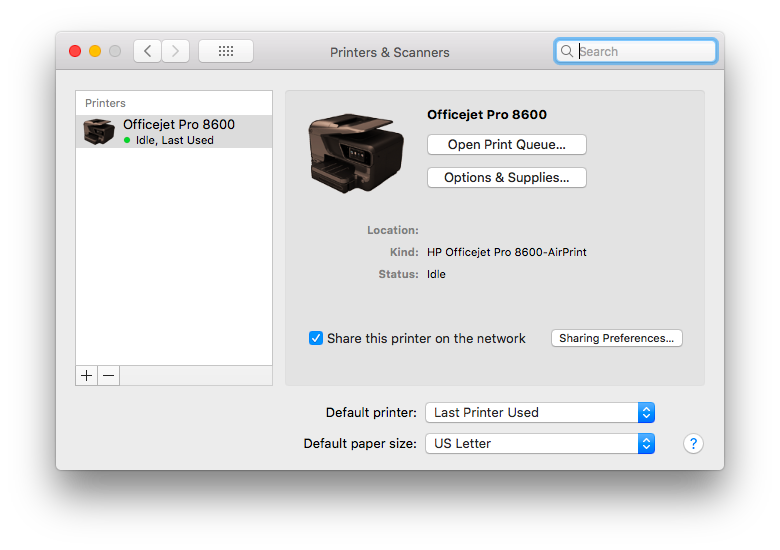
In the guest macOS’s Printer and Scanner preference pane, click on the “+” click in the lower right-hand corner below the list of printers. That list is probably blank.
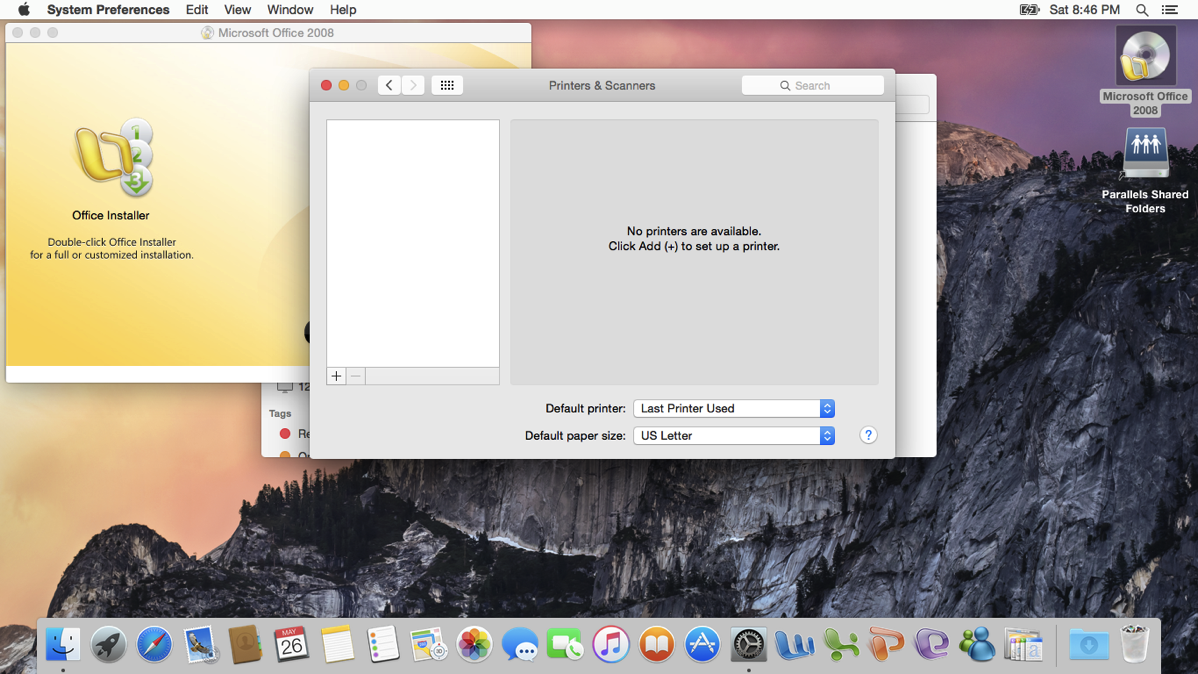
You’ll see a selection for your host OS’s printer followed by an @ sign and the host computer it’s attached to. Choose that printer. You’ve set up a tiny network right in your computer.


With Shared folders and shared printers, you’ve set up the system. Use the Mission Control to set up a virtual screen. Use Control and the <- and -> arrow keys to move between your host OS screen and your guest OS screen.
Happy Computing!
Converting macOS 10.8 into an .iso file
I want to thank Faiz Saleem for giving me the clues on how to do this. He told me that Disk Utility would convert the .dmg file into a .cdr. CDR is Apple’s name for an .iso file, which is what Linux and Windows use for installation files. Just rename the .cdr file to .iso and you’re set to go.
First, download macOS 10.8. This will take some time to download. You may want to start this before you leave for work or school. You’ll find it in the Applications folder when you come home.
Second, open up the Disk Utility. For this, I used the Disk Utility from 10.13.4.
Third, control-click on the Install OS X Mountain Lion app. A menu appears under the cursor. You want “Show Package Contents”, which displays the internal folders and files within the app.

Now you see a folder named “Contents”. Double-click on that to open it.

You’ll see some more folders. You want “Shared Support” Open it.

You’ll see two files, a .dmg named “Install ESD.dmg” and another .mpkg file named “OSInstall.mpkg.”

You want the InstallESD.dmg file. Click and drag it to your Desktop.
You’ll see a file on your Desktop. It may be an alias if you dragged it from the /Application folder on your Mac. If you drag it from another drive altogether, you’ll get a copy weighing in at over 4 Gb. This is the meat of the matter.
You’ve succeeded in isolating the InstallESD.dmg file in either case.
Now to convert this .dmg file into a .cdr file, which you then rename as an .iso file.
Go to the Disk Utility’s menu. Make sure you can see all the drives plugged into your Mac in Disk Utility. These are the internal drives and the external USB, Firewire, and Thunderbolt connected drives.

Now go to the Images menu. You want “Convert…” Click on it.

You’ll now want to add the InstallESD.dmg file. Go to the Desktop and choose it.

Now you choose the format to convert this .dmg to. You go to the menus below the list of files. You choose “no encryption” and the file format as “DVD/CD master”

The conversion begins. It will take some time, as this is an over 4 Gb file! Be patient.
If successful, you’ll see an on-screen message “Operation successful”. Click on the “Done” button to finish. Exit Disk Utility.

Now change the extension on the “InstallESD converted.cdr” file so it reads “InstallESD converted.iso”. You’ll get a warning about changing a file’s extension. In this case, go ahead, you want to change this file’s extension.
You’re set to go! Go to Parallels Desktop/Parallels Desktop Lite to open this installation file and install OS X Mountain Lion as a guest OS.
Wednesday, May 23, 2018
Senior Correspondent Arnold Woodworth's Weekly Web Wrap for Wednesday, 5-23-2018
Many service-industry jobs where employees have to be on their feet all day don’t allow workers to check their phones while they’re on the clock.
Quartz spoke with airline attendants, bartenders, waiters, baristas, shop owners, and (very politely) TSA employees who all said the same thing: The Apple Watch keeps them in touch when they can’t be on their phones at work.
Checking notifications on the sly connects you to the outside world, and also can keep you informed in case there’s an emergency at home.
https://qz.com/1282210/the-apple-watch-has-found-a-surprisingly-useful-home-in-the-service-industry/
23 tips and tricks to get the most out of your Apple Watch
1. You can use your Apple Watch to find your iPhone if it gets lost.
4. You can silence your Apple Watch by covering it with your hand.
And lots of other tricks.
http://www.businessinsider.com/apple-watch-tips-tricks-features-2018-5
7 Features That Finally Make the New Apple Watch Worth It
https://www.popsugar.com/news/Apple-Watch-LTE-Series-3-Details-44005001
AirPods are what the Apple Watch should’ve been
Like many Apple products from the Steve Jobs era, AirPods “just work.”
AirPods are one of the most seamless products Apple has released in years.
https://qz.com/1283782/airpods-are-what-the-apple-watch-shouldve-been-to-apple/
1Password 7 for Mac warns if you’ve been owned
1Password 7 for Mac notifes users of breaches, warn of bad habits, and highlights vulnerable passwords. 1Password mini has a new look, and there’s a new sidebar with a dark theme.
It’s the first really significant update in over two years.
1Password 7 for Mac can be downloaded now. It’s a subscription service starting at $2.99 a month. There’s a 30-day free trial, though.
https://www.cultofmac.com/549757/1password-7-for-mac-warns-pwned/
1Password for Mac gets its first paid upgrade in five years
New design, added features
1Password 7 will cost $49.99 for a limited time before going back to its usual $64.99 price tag.
https://www.theverge.com/2018/5/22/17379834/1password-mac-app-update-agilebits
24 keyboard shortcuts Mac users need to know
https://www.computerworld.com/article/3023544/apple-mac/24-keyboard-shortcuts-mac-users-need-to-know.html
Today in Apple history: Apple’s ‘Get a Mac’ campaign came to an end
Remember the two guys saying “I’m a Mac … and I’m a PC” ?
On May 21, 2010, Apple quietly ended its long-running, award-winning “Get a Mac” marketing campaign.
The original “Get a Mac” ads arrived in 2006.
A total of 66 ads were made.
https://www.cultofmac.com/548865/apple-get-a-mac-ad-campaign-ends/
Today in Apple history: Bill Gates predicted doom for Apple’s biggest product
A very interesting bit of history.
In 2005, Bill Gates predicted that mobile phones would do most of what Apple’s iPods did and that the iPod would eventually fail.
But he failed to predict that Apple would introduce the very mobile phone (called iPhone) that would make his prediction come true.
Shortly after Steve Jobs introduced the iPhone in 2007, Microsoft President Steve Ballmer laughed at the iPhone.
Microsoft missed the biggest change in computing ever — the smart phone — despite Microsoft Chairman Bill Gates prediction.
https://www.cultofmac.com/480695/today-in-apple-history-bill-gates-predicts-doom-for-apples-biggest-product/
Apple drops 24 percent off cost of a cable you really need
A USB-C Lightning cable has several uses, including faster charges for recent iPhone and iPad models.
https://www.cultofmac.com/549529/usb-c-lighting-cable-price/
Apple quietly cuts price of its USB-C to Lightning cable down to $19
http://bgr.com/2018/05/21/apple-usb-c-lightning-cable-price-drop-19/
Belkin today introduced a certified Lightning to 3.5mm audio cable, and announced that pre-orders will begin on its website.
Lightning to 3.5mm audio cables have been available for several years, but Belkin's edition is certified by Apple under its MFi Program, which was recently expanded to include specifications for this type of cable.
https://www.macrumors.com/2018/05/22/belkin-lightning-to-3-5mm-audio-cable/
US iPhone sales last quarter jumped by 16% as the rest of the market fell by 11%
A new report from Counterpoint Research reveals that Apple during the first quarter of 2018 saw iPhone sales in the United States jump by 16%. In stark contrast, overall smartphone sales in the U.S. fell by 11%. The takeaway here is significant: even in a market where smartphone sales are slumping, Apple still manages to see an uptick in year-over-year iPhone sales.
http://bgr.com/2018/05/22/iphone-sales-vs-samsung-galaxy-q1-united-states/
Two videos:
This app hacked the iPhone’s dual camera system, and you’ve never seen anything like it
The app is called Apollo, and it’s available right now from the iOS App Store for $1.99. Trust us, it’ll be the best $1.99 you spend all week.
http://bgr.com/2018/05/21/iphone-x-camera-specs-apollo-app-portrait-lighting/
Video:
iPhone X - Honest 6-Month Review
https://www.youtube.com/watch?v=P-Cu-FEB8x4
iPhone X's Face ID reviewed, six months later
Face ID replaced Touch ID in Apple’s latest and greatest iPhone.
Six months down the line, Face ID continues to prove the security switch was worth doing.
https://appleinsider.com/articles/18/05/23/iphone-xs-face-id-reviewed-six-months-later
How to Get Better Recommendations From Apple Music, Spotify, and More
If you’re struggling to find new music and your app of choice isn’t helping, don’t give up. There are a bunch of simple ways to improve those recommendations.
https://lifehacker.com/how-to-get-better-recommendations-from-apple-music-spo-1826080177
Attention Music Lovers: Here's Why You Should Consider Investing in an Apple HomePod ASAP
There is a strong case to be made for it being the ultimate music lover's speaker. Not only is the sound quality out of this world, the HomePod also comes armed with the most incredible range of music personalization available. After spending a couple of weeks using the combination of Apple Music and Apple's smart speaker, I can officially say that it dramatically upped the quality of my music game.
One of the most important things to note about Apple Music's curated playlists is that there are no machines involved — each and every playlist is handcrafted by human editors who love the music just as much as you do.
Siri can hear you — no matter what.
https://www.popsugar.com/news/Apple-HomePod-Review-Music-Personalization-44670679
Inexpensive Logitech Crayon iPad stylus debuts just for students
Logitech’s $49 active stylus for iPad unveiled back in March just debuted. However, at this point the Crayon can only be purchased through Apple’s Education channel.
https://www.cultofmac.com/548477/logitech-crayon-release-date/
Logitech Crayon for iPad now available to schools, half price of Apple Pencil
The Logitech Crayon, a lower-cost stylus using Apple Pencil technology, is now available for purchase by schools for $49.95.
Logitech says that it’s designed specifically for use with the 6th-generation iPad. It relies on short-range RF, rather than Bluetooth, so it is incompatible with all other iPad Pros currently on the market.
https://9to5mac.com/2018/05/16/buy-logitech-crayon/
Best iPad apps for Apple Pencil
15 really good apps.
https://www.macworld.co.uk/feature/iosapps/best-apple-pencil-apps-3677307/
The best note-taking apps for the iPad Pro and Pencil (2018)
https://www.slashgear.com/the-best-note-taking-apps-for-the-ipad-pro-and-pencil-2018-18528110/
The Apple iPad 9.7" Is Everything We've Been Waiting For
The latest generation of iPad — better known as the iPad 9.7" — comes with every single thing that you could possibly want in a tablet.
I believe the Apple iPad 9.7" is the model that's finally worth the cost of an upgrade.
https://www.popsugar.com/news/Apple-iPad-97-2018-Apple-Pencil-Review-44764884
Remember to check this web site every day for new bargains on apps for iPhone and iPad.
http://bgr.com/apps-on-sale/
Why Are My Parents' iPhones All Synchronized Up?
Apple thinks that both of her parents’ iPhones belong to one person instead of one belonging to the husband and one to the wife.
Why?
When setting up this iPhone for the first time (or again), one of parents decided it would be more convenient to just use the same Apple ID as the other device.
Fortunately, this article tells you how to solve this problem.
https://lifehacker.com/why-are-my-parents-iphones-all-synchronized-up-1826129918
2 Easy Ways to Find Your iPhone When It's on Silent
The second way is a clever trick that I wouldn’t have though of.
https://www.popsugar.com/tech/How-Find-Your-iPhone-Silent-37631381
The Most Popular iPhone and iPad apps on App Store
https://wtop.com/national/2018/05/the-top-iphone-and-ipad-apps-on-app-store-25/
9 Things You Need to Do Before Selling Your iPhone
https://www.popsugar.com/tech/How-Delete-Everything-Off-iPhone-35834842
Follow These 7 Steps to Erase All Your Data Before Selling Your MacBook
After all, you DON’T want the person you sell ONLY your old computer, NOT all your personal information on it too.
https://www.popsugar.com/tech/How-Delete-Everything-MacBook-42805722
Change My View: MacBook Pro keyboard issues are embarrassing but overblown
In most cases, the issue appears to occur when a small piece of debris gets trapped in the mechanism. Apple recommends cleaning your keyboard with compressed air to resolve the problem, and in most cases that does the trick.
Sure, it shouldn’t have happened. I’m not disputing that. But I do think that calls for Apple to recall the models affected, and lawsuits demanding – among other things – full refunds, are excessive.
I’ve experienced the issue myself, with the space bar. It was irritating, and left me unimpressed by the company’s quality control processes.
But, a few seconds with a can of compressed air resolved it. That’s not great, of course. A machine costing thousands of dollars shouldn’t require owners to go out and buy a can of compressed air, then use it, perhaps on a semi-regular basis. But I do think it’s a bit of a first-world problem. I don’t think it justifies recalling the models, and I don’t think it justifies refunding the purchase cost.
https://9to5mac.com/2018/05/17/change-my-view-macbook-pro-keyboard-issues-are-embarrassing-but-overblown/
How to Join the Class Action Lawsuit Over Apple's Crappy MacBook Keyboards
If you bought a MacBook with butterfly-switch keys, you probably qualify to join the lawsuit. That includes any 12-inch MacBook model from 2015 or later. It also covers the MacBook Pro from 2016 onwards (with or without the Touch Bar). And you don’t have to have a messed-up MacBook to participate. Girard Gibbs LLP (the firm behind the new suit) doesn’t specify that you need to have experienced any keyboard issues in order to join the class-action lawsuit.
Start thinking about what you might do with the sweet $20 you’ll make if the lawsuit prevails—as tends to be the case with litigation like this.
https://lifehacker.com/how-to-join-the-class-action-lawsuit-over-apples-crappy-1826013873
How to keep using Time Machine without AirPort or Time Capsule
You can use an ordinary hard disk instead. This article has detailed instructions.
https://www.cultofmac.com/545927/use-time-machine-without-airport-time-capsule/
Apple launches new privacy portal, users can download a copy of everything Apple knows about them
https://9to5mac.com/2018/05/23/download-all-apple-id-icloud-data/
http://privacy.apple.com/
How to Delete or Deactivate Your Apple ID Account and Data
While any customer anywhere can delete an Apple ID account, Apple says the ability to deactivate an Apple ID account is limited to accounts with locations set in the European Union, Iceland, Liechtenstein, Norway, and Switzerland. Apple intends to roll out the deactivation option around the world "in the coming months."
https://www.macrumors.com/how-to/how-to-delete-or-deactivate-your-apple-id-account/
TeenSafe phone monitoring app leaks teens’ iCloud logins in plaintext
A security researcher has discovered at least two servers hosted by a “secure” monitoring app for iOS and Android, TeenSafe, that were up on Amazon Web Services (AWS) for months without the need for a passcode to get at their data.
The mobile app, TeenSafe, bills itself as being a “secure” monitoring app built by parents, for parents. It lets parents view their kids’ text messages, monitor who they’re calling and when, to track their phones’ current and historical locations, to check their browsing histories, and to see what apps they’ve installed.
The leaky servers were discovered by Robert Wiggins, a UK-based security researcher who searches for public and exposed data.
https://nakedsecurity.sophos.com/2018/05/22/teensafe-phone-monitoring-app-leaks-teens-icloud-logins-in-plaintext/
How to uninstall MacKeeper from your Mac
Some people regret installing MacKeeper but can't figure out how to remove it. We're here for you.
https://www.macworld.com/article/2861435/software-utilities/how-to-uninstall-mackeeper-from-your-mac.html
How to delete the 'mshelper' malware from macOS
As it isn't a virus, it is likely mshelper is distributed through an installation of another piece of software rather than spreading organically.
https://appleinsider.com/articles/18/05/18/how-to-delete-the-mshelper-malware-from-macos
The 2 Questions Steve Jobs Used to Get Brutally Honest Feedback
Steve Jobs knew all about how uncomfortable people can be bearing bad news, so he came up with a clever way to extract honest appraisals from his teams.
Question 1: Ask one person “Tell me what’s NOT working."
Question 2: Ask a different person “Tell me what is working.”
Jobs would alternate between the two questions until he felt like he had a handle on what was going on.
https://www.inc.com/jessica-stillman/the-2-questions-steve-jobs-used-to-get-brutally-honest-feedback.html
Steve Jobs Used These 3 Deceptively Simple Questions to Turn Apple into an Innovation Powerhouse
1. "What's not working?”
2. "Why doesn't it work?”
3. "Is this the best you can do?"
https://www.inc.com/geoffrey-james/steve-jobs-used-these-3-deceptively-simple-questions-to-turn-apple-into-an-innovation-powerhouse.html
20 Years Ago, Steve Jobs Said 1 Thing Separates Living an Exceptional Life From an Average One
Every day, do a few things differently from the people around you.
After a week, you'll be uncommon. After a month, you'll be special.
After a year, you will be exceptional.
And you'll have done so on your terms.
https://www.inc.com/jeff-haden/20-years-ago-steve-jobs-said-1-thing-separates-living-an-exceptional-life-from-an-average-one.html
Steve Wozniak:
Bitcoin And Blockchain Will Achieve Full Potential In a Decade
Wozniak explained his positive outlook on blockchain by the fact that there are many useful applications for the technology in a number of areas.
https://cointelegraph.com/news/steve-wozniak-bitcoin-and-blockchain-will-achieve-full-potential-in-a-decade
Steve Wozniak tells us: 'We've lost our privacy and it's been abused’
Woz said:
“What bothers me more than anything in the world is when technology goes bad.”
“We lost our security a long time ago. We've lost our privacy and it's been abused.”
“Data sharing makes us subjects of others, of control. I don't like that. I think people should be independent and free.”
Woz also answered a question about whether monopolists like Apple, Google, Facebook, and Amazon should be split up.
http://www.businessinsider.com/steve-wozniak-weve-lost-our-privacy-and-its-been-abused-2018-5
7 Gmail tips every emailer should know
https://www.cnet.com/how-to/7-gmail-tips-every-emailer-should-know/
Facebook Announces Partnership with Think Tank Connected to NATO, Military Industrial Complex
Facebook announced a new partnership with the Atlantic Council, a think tank which officially claims to provide a forum for international political, business, and intellectual leaders. The social media giant said the partnership is aimed at preventing Facebook from “being abused during elections.”
Essentially, the Atlantic Council is a think tank which can offer companies or nation states access to military officials, politicians, journalists, diplomats, etc. to help them develop a plan to implement their strategy or vision.
https://www.activistpost.com/2018/05/facebook-announces-partnership-with-think-tank-connected-to-nato-military-industrial-complex.html
The Privacy Scandal That Should Be Bigger Than Cambridge Analytica
Wireless carriers are sharing your real-time location with shady third parties—and a bug lets anyone use that data to track you.
The story involves the real-time location-tracking data that the four largest U.S. wireless carriers collect on everyone with a mobile device. Basically, they know roughly where you are at all times, even if you don’t have your GPS turned on, based on the regular interactions between your phone and nearby cell towers. The carriers aren’t supposed to share that information without your consent.
But the New York Times reported earlier this month that a company called Securus Technologies was offering a service that allowed users to track people’s whereabouts in real time, using data obtained from the wireless companies through a pair of intermediaries.
It gets worse. A Carnegie Mellon researcher poking around on LocationSmart’s website found that he could use a free trial service to instantly pinpoint the location of, well, just about anyone with a mobile phone and wireless service from one of those major carriers. He did this without any permission or credentials, let alone a warrant.
https://slate.com/technology/2018/05/the-locationsmart-scandal-is-bigger-than-cambridge-analytica-heres-why-no-one-is-talking-about-it.html
Google and Android are still failing us on messaging and encryption
Refusing to offer default end-to-end encrypted messaging — nevermind across platforms — in 2018 is technological malpractice.
iMessage is right even as it's wrong
I'd been loathe to accept Apple's iMessage on principle.
To the Apple user, it's seamless. There's absolutely no thought involved. To borrow the phrase, it just works.
But a modern messaging service must work across multiple platforms. It's the right way to do it, and it's the right thing to do. Apple's gonna Apple, however, and so iMessage continues to be available on hardware that funnels money directly to Apple, and nowhere else.
https://www.androidcentral.com/google-and-android-are-still-failing-us-messaging-and-encryption
