


The MacValley blog

Welcome to the MacValley blog, your first stop for all the latest MacValley news and views.
|
The MacValley blog Editor: Tom Briant
|
|

Tuesday, March 6, 2018
Ten Ways To Save Your Eyes when using Your Mac
I am a Mac computer user with bad eyes. I found ten ways to enable me to read the screen in comfort.
#1. Magnify the screen.
Go to the Accessibility System Preference.

Select Zoom from the left-hand column.

Set your parameters for the keyboard and your pointing device. I chose to use the Control key and my mouse’s scroll wheel. You can choose another key to initiate and use your Trackpad. Slide two fingers up and down the trackpad.
You can choose to magnify the entire screen or just a portion of it with “picture in picture” You only have a rectangular window option.
Click on the “Options…” button to see this:


You can set the minimum and maximum zoom. You can trigger a temporary magnification by holding down the Alt/Option and Command keys.
#2 Zoom-It
For $2.99 on the Mac App Store, you can buy and install the Zoom It application.
Zoom It offers more options, such as a sticky window if you use Option+Z or just a temporary window by holding down the Control + Z keys.

You also get a choice of windows, either a rectangular window or a round loupe.
You can set the magnification factor in Zoom It’s preferences.
It’s worth the $3.
#3 The HiDPI Terminal Command
If you use a monitor of 1920 x 1080 resolution or higher, I can recommend this Terminal command.
sudo defaults write /Library/Preferences/com.apple.windowserver.plist DisplayResolutionEnabled -bool true
Copying and pasting it into your Terminal installs a scaled resolution option in your Displays System Preference, including a ¼ scale HiDPI.
If you use 1920 x 1080, your resolution goes down to 960 x 540 with larger pixels. This is the equivalent of the Retina screen. A 2560 x1440 screen reduces to 1280 x 720. It’s salvation for my old eye balls.
You can run one monitor at regular high resolution and add a second monitor just for HiDPI situation.
I’d recommend you read this Tek Revue post for more details, including utility apps for switching resolutions without using the Terminal.
#4 Changing your screen colors to grey-scale
Under the Accessibility Preference Pane is an option to change your display to grey-scale. For some users, this provides relief.
For this and #5, you’ll want to go to Display on the left-hand column of the Accessibility Preference Pane
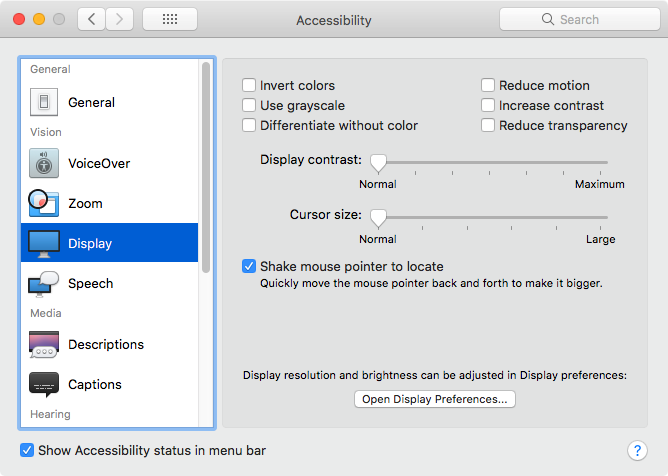
#5 Changing your screen colors to inverse

From the Display option of the Accessibility Preference Pane, you can choose to invert your screen
Now if you like this inverted colors effect, you can set up a keyboard shortcut for it.
Go to the Keyboard Preference Pane
From the top row of buttons, select “Shortcuts"
From the left-hand column, select “Accessibility"
On the right-hand side, you want to check the box for Invert Colors
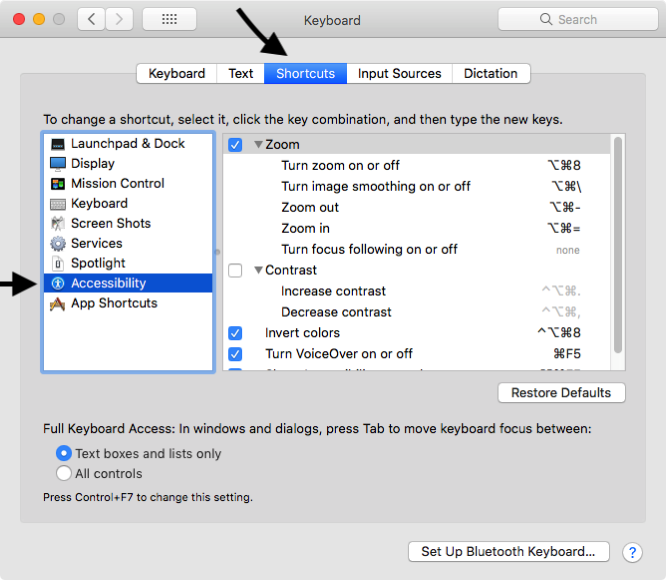
Holding down Control+Option+Command+8 inverts the display’s colors. Most of us will find this garish, but certain people will benefit from this. It’s an option.
#6 Change each app’s default font size.
Windows has an overall font size option. macOS doesn’t. You have to adjust each app’s default font size individually
You’ll have to change one on a case by case basis.
#7: Add an external monitor with higher resolution:
My 11” MacBook Air has a native resolution of 1366 x 768. I can plug a big 23” monitor with 1920 x 1080 resolution into it to help with tiny text. Look at the Fry’s Home Electronics Ads for sales on external monitors. They also have the adaptor cables to help you use your Mac with the new monitor.
#8 The Paid Options: New Glasses
Depending on the weakness of your vision, you have several choices.
Off the shelf reading glasses from the drug store may solve your problem.
You may want to consult your optometrist about specialized computer glasses.
It may be time to see the optometrist for a new prescription. Now is the time to bring up your computer issues.
#9 Have Your Mac read
Another option to consider is the Mac’s ability to read text on screen back to you. Go to the Accessibility System Preference to set this up.
Go to the left column and select Speech
In the right-hand column, you can select which voice to use, how fast it speaks, and which keys to press to have selected text read aloud to you.

#10-Get a New Mac with a Really Big Screen
My final option is the most expensive. Buy a New Mac. Go for the iMac with 5K 27” worth of display if you can. You can also check out the 21.5” 4K monitor.
The latest 13” MacBook Air will support 4K 3840 x 2160 resolution at a 60Hz refresh rate on an external monitor.
The 2014 Mac Mini will support on external monitors 4K resolutions, albeit at low refresh rates: 3840 x2160 at 30 Hz and 4096 x2160 at 24 Hz.
Thomas Briant
Editor, MacValley Blog


Sunday, January 24, 2016
Problems getting Yahoo! Mail through Apple Mail. Here are three free alternatives
I recently got an e-mail from a fellow MacValleyite complaining that Apple Mail would not receive Yahoo! Mail any more. They use Snow Leopard 10.6.8.
I then checked my own Apple Mail running under 10.11.2. I found that Apple Mail had stopped receiving Yahoo! Mail early in January. I could find nothing to fix the problem. So I knew I needed an alternative to access Yahoo! Mail.
I need Yahoo! Mail because I have ATT U-Verse and Wireless service. ATT has contracted with Yahoo to use their e-mail as ATT’s e-mail. That’s how I get my notification each month that my U-Verse bill is ready to be paid.
I can’t ditch Yahoo! Mail without switching Internet Providers. That’s a hassle for the future.
So, what alternatives did I find to Apple Mail for receiving Yahoo! Mail. I found three of them.
The first was to use Yahoo!’s Web client. I just used Safari to log into Yahoo.com and Yahoo! Mail came right up.
The second was to download and install Mozilla’s Thunderbird e-mail client. Thunderbird has the advantage of working with both IMAP and POP3 e-mail providers. It has many add-ins. The only criticism I’ve read about concerns its esthetic appearance. It still looks the same as it did 10 years ago.
If you want an e-mail client with an up to date appearance, may I suggest Nylas N1? It is advertised as an “extensible, open source mail client”. If you want to try the latest e-mail client, this is it.
Right now, it’s free. It’s easy to set up your e-mail accounts. It only supports IMAP from what I could tell. Right now the developers want to encourage as many other developers as possible to make plug-ins for this app. It is NOT compatible with the Thunderbird plug-ins, though.
That’s my off the cuff suggestions for getting Yahoo! Mail if Apple Mail has stopped working on this account for you.
Tom Briant
Editor, MacValley Blog
Wednesday, August 26, 2015
MacClean-a free handy clean-up utilty
iMobie, the Chinese developers of MacClean, sent me an e-mail about this app. They asked me to try it out. So here is my review.
I found MacClean a useful utility program,although it is not full-featured as paid utility packages. I believe iMobie made it available to Mac users in order to entice them to try out their paid apps for iOS devices.
When you install the app, it wants you to choose the language with this screen:

I am curious why it offered Japanese but not Chinese. But no matter, it sets up the program.
You start with this screen, offering two options, Smart Clean and Utilities:


For Smart Clean, you have six options for items to clean. For Utilities, you have a grid of nine utilities to clean up your Mac.
I won’t go into every utility. For Old and Large Files, your default is to search all the files for those over 10 megabytes in size and older than today’s date.

You can choose between subcategories of files:

And use the sliders to increase the file size and change the date. I would have preferred the option of entering the number of the file size searched for and to use a calendar widget to set the date.
The results column to the right of the search parameters shows the found files in descending order as the default. You can click on the downward carat next to “By Name” to select name, date or size and whether you want them in ascending or descending order.
The App Uninstaller shows some rough edges. It displayed multiple instances of programs, which I couldn’t tell apart at first glance. By hovering the mouse over the app’s icon, though, a border appeared with an “i” in the upper right-hand corner. Click on that to see details about the app, such as its location and file size.

iMobie keeps the MacCleanmanual on-line in a blog, soliciting comments. I found the language crisp and easy to understand. You can find out the details of MacClean here.

Now you reach this manual by clicking on a link on the opening page at the bottom left-hand corner. Annoyingly, if you try to reach Help from the Menu Bar, you get a message that help isn’t available! This needs fixing.

Summary:
MacClean is a good, light cleaning utility for your Mac. It has its quirks, such as exiting if you click on the red button in a window (!); but it works well within its limits.
Here’s the link to download it.
Tom Briant
Editor, MacValley Blog
Tuesday, August 25, 2015
The editor's views on various topics
Some policy remarks
This blog will start to cover the use of Linux as a complement to OS X. I am not engaging in ridiculous comparisons of OS X 10.10 to some Linux distro touted as a “Apple killer.”
No distro of Linux will kill off OS X. Linux lacks the financial wherewithal to challenge OS X on its home turf. Yet OS X can’t challenge Linux on its own turf.
I will show you how to use Linux applications to complement OS X. As I have previously written, Linux has two good iTunes music streaming applications in Tangerine and forked-daapd. If you own a nice MacBook Air or one of the latest MacBooks, you probably lack the space on the SSD for all your music. An iTunes streaming program provides one answer to your problems. Stuff a 1 TB drive into a old mini-tower and your music storage needs are satiated.
Now to the other news and views of the day. Tim Cook got stock valued at 58 million dollars. Great news for him and for us. Executives who keep their business delivering great products deserve to be compensated.
On the bad news side for Tim, his e-mail to Jim Cramer of CNBC will earn him some scrutiny from the Securities and Exchange Commission for a violation of regulation FD. You’re not supposed to disclose information about a company you head without immediately releasing to the public. The fact that Cramer probably can’t stop talking about anything is no defense. So Tim and Apple may have to pay a fine. A small fine. Violating an SEC regulation versus staunching the bleeding on the stock exchange? Worth it.
In Newz you can Uze, “Crazy” John Moltz, skewed observer of the Apple scene, wrote an article for Macworld.com. Sometimes you have to bite the bullet and stop migrating your versions of OS X. Sometimes you have to back it up-three times!-format the hard drive or SSD, and start all over again. This may be the only way to get rid of years of digital dust bunnies.
Jason Snell of Sixcolors.com wrote a column at his former home, Macworld, about the iPad. The iPad does not sell these days as it once did. Oh, it sells. But once I got mine...I didn’t need another one. The darn thing runs and runs without any problems.
So I await the legendary iPad Pro. Will it have a USB-C port replacing the Lightning port or in addition to it? Will it come with a special stylus? Will it be 4K in resolution, like some of the big Android tablets? I don’t know. I’ll wait till the day of the announcement. Maybe this September.
This is a Mac blog. I try to squeeze mentions of the iOS devices, but my focus is what my eyes focus on. An ASUS monitor hooked up to a mid-2011 Mac Mini running Yosemite and Windows 10 caged up in a virtual Parallels installation.
Yes, I got Windows 10 to work by upgrading from Windows 8.1 to Windows 10. I was patient and waited my turn for the word from Microsoft to upgrade. It still works. More to follow.
But back to OS X and LInux. Linux offers those with an itch to do over their computer’s stock look with all kinds of options. A plethora of desktops, ways to make it look like everything from Windows XP to an Amiga. You can’t do that in OS X. El Capitan will apparently nail down Apple’s idea of a user interface.
Most old Windows computers come with a DVD drive, so I shall show you how to rip CDs in a variety of audio formats. That’s my next article.
LInux and OS X share some under-the-hood software, such as the CUPS printing system. Article on exploiting that coming up, too.
As for the Apple Watch, it has much promise. Right now, I believe it’s a bauble for the rich and famous to flaunt on Instagram.
Tom Briant
Editor, MacValley Blog
Friday, July 10, 2015
The Editor States his opinions...you might agree with some
Hi, I’m Tom, the editor of this blog. I have written sporadically, but a few things changed in my life recently that will affect how I write.
First, I turned 60. The odometer of life turned to all zeros. I realized that I was not a kid of 21 anymore. I have often fancied myself a kid of 21, for 21 was an important year for me. I remember the Popular Electronics cover story about the Altair 8080 personal computer that came as a kit. I knew I would own a personal computer some day.
But now I’m 60. I have set opinions determined after some experience.
Second, don’t worry, I’m not engaging in political rants. Turn on your car radio if you want that. No, my rants will concern computers and how to get the most from them.
Third, I’m a writer first and foremost. Writers used to collect fancy pens; I collect various types of writing apps. I will write about them and how to wring the most of their features.
I listen to music, I love music (classical, jazz, and some rock), but I don’t write or play music. I also don’t intend to subscribe to Apple Music at this time. I have written about recording music on my Mac so I could move it to a CD or an external hard drive or iOS device for future enjoyment. Expect articles on that topic.
Same with graphics applications. I can’t paint or draw. My photography skills are limited, too. I can use screen captures and the Preview application to illustrate my articles. My graphics talent stops there.
If YOU, though, want to express your opinion on Apple Music and Garage Band and Logic Pro and the plethora of music software out there, I’d enjoy hearing from you. Submit a manuscript in 500 words or less in Rich Text Format (.rtf), Microsoft Word (.doc or .docx), Pages (.pages) or Plain Text (.txt). If I can read it, I’ll accept it at thomasbriant@me.com. I’ll edit it for grammar and spelling, then I’ll send it back to you for final approval.
The same goes for graphics applications and games. 500 words or less in a Mac-compatible format. If you want to include pictures, please include them as a separate attachment.
Fourth, I will write about Windows and Linux as well as Macs. If you work for a large organization, as I do, you’ll have to work with Windows. I have tried out the previews of Windows 10 and I think it’s definitely better than Windows 8.1. Having said that, I am certain that a cottage industry will flourish for improvements to Windows 10. For example, Windows 10 has an app menu; but for those demanding the Windows XP/7 Start Menu, you’ll need a 3rd party program.
As for Linux, I like it. I use derivatives from the Ubuntu version of Linux to meet my needs. I quintuple-boot between 3 versions of Linux, Windows 7, and Windows 10 Preview. I’m a mega-nerd.
I regard Linux as the garage bench for testing out ideas about operating systems that you’ll see in Windows and OS X in the future. For example, Linux has had app stores called “repositories” for years before OS X and Windows put them in. The interface lacked the slickness of the OS X and Windows App Stores; but you had a choice of numerous programs that someone had checked for malware before you tried them.
Fifth, I want my readers to take away something they can use to improve their experiences with the computer. I will assume that a lot of my readers regard the computer as promising, but somewhat alien. “How do I…?” comes to your minds.
I will assume that my readers have learned how to ride bicycles in their childhood. You started out with training wheels, you advanced beyond them, albeit with a few skinned knees and soon you expanded your range outward.
I have set as my goal of getting you back on the bicycle seat, so to speak, and giving you advice as to how to stay upright and moving forward.
Tom Briant
Editor, MacValley Blog
Sunday, November 3, 2013
Ted Landau from Macworld has a list of Mavericks Bugs and Fixes
Ted Landau of Macworld.com has a valuable list of Maverick bugs and their fixes.
Among the listed programs are Shirt-Pocket Software’s Super-Duper, which I have often recommended for cloning partitions. It’s still good.
Tom Briant
Editor, MacValley Blog
Friday, November 1, 2013
My Experience with Mavericks So Far
I’ve had Mavericks 10.9 on my production system for a week now. I’m pleasantly surprised by what hasn’t broken in the process of the upgrade.
Only Flip4Mac broke and Mavericks knew it would break. It moved it to a non-compatible software folder and alerted me during the upgrade.
Applications that I consider essential work just fine. Quicken 2007 works just fine. Word, PowerPoint, and Excel 2011 work just fine.
The only app that has given me any trouble has been Macjournal 6 in trying to use it as a blogging tool. This may be due to my dumbness, so I’m trying MarsEdit 3.6.2 as a substitute blog editor for this post.
Tom Briant
Editor, MacValley Blog
P.S.
MarsEdit 3.6.2 worked just fine.
Friday, December 16, 2011
Holiday Floobydust
So what’s going on vs a vs Apple Computers?
Apple rumored to release MacBook Pro with Retina Display (2880 x 1800 pixels) in the Second quarter of 2012.
Steve Jobs not named “Person of the Year” by TIME Magazine. Instead he got a “Fond Farewell” with Tim Cook noted as a “Person Who Mattered”.
Samsung ramping up production of the A5 chip used by the iPad and iPhone 4S at its Texas facility. The facility has created over 1,000 jobs in Texas.
I can’t explain the relationship between Apple and Samsung. They cooperate on the chip for the iPhone and iPad, yet they fight over Samsung’s Galaxy tablet looking too much like the iPad. You married people should leave a comment here.
Apple’s rumored investment in Israeli flash memory maker Anobit makes sense. Anobit’s technology is already used in the iOS devices and the MacBook Air. See this article in Appleinsider for more details.
Apple's investments in acquiring flash memory expertise and technology appear to be centered around packing more storage capacity into Macs and iOS devices at lower prices, with the same level of component reliability and longevity.
On more immediate matters, Christopher Breen shows you how to set up the perfect holiday playlist at Macworld.com.
At Maclife.com, they give you 10 tips for extending the usability of an older Mac. This doesn’t include gutting the insides and making an aquarium out of it.
And in news of other tablets, Amazon announced that it had sold “millions” of Kindle Fire tablets, although no specific sales figures were supplied. Will Amazon erect a golden arch with “millions sold” emblazoned on it?
Analysts have pulled studies out of their…files and concluded that Apple’s market share of the tablet market will slip from 61.5% to 59%. Still more people prefer an iPad as a gift to either Obama or Romney on their doorstep singing Christmas carols. So I wouldn’t worry about the iPad.
A survey of analysts’ spouses and kids showed a 100% iPad favorable response to “Would you like an iPad for the holidays? Or would you prefer an Android tablet running Peanut Brittle or whatever version of Android is available?”
Tom Briant
Editor, MacValley Voice
Tuesday, December 13, 2011
The News for December 13th (well, some of it)
Good Morning, Mac Users!
First up, our arch frenemy Microsoft released an iPad version of its One Note program. Speaking as one who has used the M$ Office version of this, you should jump on it. One Note is a really good program and it's free. At least for the initial acquisition. Thank you, 9 to 5 Mac..
From Appleinsider comes news that Apple is planning to use part of its Scrooge McDuck-sized cash reserves to buy Anobit, an Israeli flash memory company. Anobit has founds ways to enhance NAND flash memory and Apple is reportedly already a customer.
From AppleInsider comes news that the MacBook Air sales continue to grow. A new 15 inch model reportedly is in the works and will join its 11.6" and 13.3" siblings early in 2012. Meanwhile, PC Makers are scrambling to compete with the MacBook Air through the "Ultrabook" initiative.
Now for iPad news. The Taiwanese industry newspaper (and gossip monger) Digitimes reports that the iPad 3 is on its way within the next 3-4 months. Hopefully the high resolution Retina display is coming, too.
A recent report out of Japan claimed the iPad 3 may actually be slightly thicker than the current-generation iPad 2, though the reason for the purported increase remains unknown. The device will, however, reportedly still be compatible with Apple's Smart Cover.
Citigroup says it will launch in February 2012. Cross your fingers!
And it's December 13th, which means it's time for the 12 days of Christmas!
Sunday, October 30, 2011
Why You Want a Mac this holiday season
If you want my opinion on which computer to get a loved one or yourself, I’d say “Go with a Mac instead of a PC”. I have several reasons for suggesting a Mac.
1. A Mac in the long term, if not the short term, will give you less grief. I recently spent a Friday evening and all of a Saturday trying to upgrade my aging Windows XP PC. Now I’ve added memory, an extra hard drive, and a new Ethernet card to this 7 year-old machine with no trouble. When I tried to add a new video card, a fancy one featuring an Nvidia GeForce 6200 processing unit, I thought I’d have the cat’s pajamas. Instead I might as well have tried to bath a cat. I finally gave up, put the new video card back in its box for another day or another owner, put the system back the way it came, and chalked it up to experience. Bad experience. And let’s not go into what reinstalling a Windows operating system involves. The horror!
2. You pay a premium for a Mac the same way you pay a premium for a really good car. I plan to buy myself a Mac Mini for roughly $950 next spring. That’s a lot of money for such a small computer. But my Mac Mini will come with sufficient memory, lots of hard disk space, built-in Wi-Fi and Bluetooth, and two video outputs. It also comes with a Thunderbolt port (?) for when the Thunderbolt external peripherals start coming down in price to the level of ordinary mortals. Best of all, it comes with the Mac operating system, which is what Microsoft wants to beat.
3. What about the “Mac tax”? As I said, you do pay more for a Mac than a Windows machine on sale at Frys. But what else comes with that. Well, I’ll bet the machine at Fry’s comes with trial-offer software, aka “crapware.” You’ll get a free subscription to Norton Anti-Virus. After the free trial, you get socked with an annual subscription for an overly complicated program. This is my advice. If you do have to settle for a Windows machine this holiday season, install Windows Security Essentials. It’s a FREE anti-virus program from Microsoft itself. Just Google “Microsoft Security Essentials” and you’ll find the specific place on the Microsoft site for the program.
4. You’ll probably find a trial offer on a Windows computer for Microsoft Office. It costs over $100 after the free trial runs out. Here’s my advice. Check out your work or your child’s school/college for a cheaper version. If you work for the Federal Government, Microsoft wants so desperately to get a copy of Office into your hot little hands that they’ll give it to you for $9.95. Check out your agency’s Web site for the Microsoft Home User Program. The Home User Program also offers Microsoft Office for Mac for a similar price.
5. If $100 is too much for a word processor, here’s my next suggestion. Google “LibreOffice” and get a free office suite. That’s right, FREE. They will ask for donations, but that’s another matter. You can get a perfectly good office suite for FREE for Windows or Mac. Note: LibreOffice is derived from the Open Office project. The developers had a fight, and the majority split off to form LibreOffice. Same great software. If you get documents from an Open Office user, they work transparently in LibreOffice. And LibreOffice works with all versions of Word and Excel and even WordPerfect!
6. What if your beloved already has a computer and likes their printer, keyboard, mouse, and monitor? They just want to get away from Windows? You want a Mac Mini as I plan to get. Now in addition to the Mac Mini, you’ll need to get a PS/2 to USB converter cable at Staples, and adapters for the kind of monitor your beloved has.
7. Now if they use a big-screen TV as their computer’s screen, a Mac Mini is already set to go. If they use a flat-panel screen for their computer, they’re set to go when they unwrap the package. If they still use a big hot heavy tube as their computer screen, then you need to go to the Apple store to ask for a “VGA adapter for the Mac Mini”. That’s about $20, but it beats having to wait until the Apple Store is open again.
8. Got any questions? Put a comment in the blog or e-mail me at thomasbriant@me.com
9. Happy Holidays, everyone!
Saturday, October 8, 2011
Exporting Data from Appleworks 6 to iWork and others
At the October 5, 2011, MacValley General meeting, I engaged in a conversation between two other members and myself.
One member said she wanted to move on to Lion, but felt fearful. She has a lot of documents in Appleworks format. She knows that Appleworks won’t work under Lion, so what will she do?
I gave her several suggestions off the top of my head for converting various Appleworks documents into contemporary formats.
I also helped another member Saturday the 2nd with a Classic program they want to run under Leopard 10.5. All in all, MacValley has a lot of members who move slowly from past into present.
So sitting at my computers and logging onto the Intertubes, this is what I found after a day of research.
First, if you want to move from Appleworks 6 to a modern format, you need conversion software.
If you want an Apple sanctioned solution, go to Apple’s iWork Website and download the 30 day trial of iWorks ‘09. For 30 days, you can see if your old Appleworks word processing, spreadsheets, and presentations will convert into iWorks formats.
From iWorks-well, Pages, Numbers and Keynote-you can then export to 3rd party formats.
Pages can export to these formats: PDF, Word (.doc), RTF, Plain Text, and ePub.
Numbers can export to these formats: PDF, Excel (.xls), and Comma-Separated-Values (CSV).
Keynote can export to these formats: QuickTime movie (.mov), Powerpoint (.ppt), PDF, just the images, HTML, and to your iPod.
Online Resources for Appleworks to iWorks conversion
The longstanding Appleworks User Group has updated to become the Appleworks/iWork Users Group. You can reach them at www.awug.org.
Well, what about the other formats?
What about the Database format? What about the Painting and Drawing formats?
You can save Paintings in a variety of formats that OS X Preview will open, such as PNG, JPEG, and Windows BMP. So Painting is no problem.
Appleworks Drawing, though, is another matter. For that, you need Dekorra Optics’ EazyDraw 4.0. It will open up these Appleworks drawings if you use version 4.0 or before. Let me quote from their README file of their latest version, 4.1:
This version of EazyDraw (4.1) DOES NOT include support for AppleWorks, ClarisDraw, MacDrawPro, MacDrawII, and MacDraw classic drawing formats. Go to the EazyDraw support web page: http://www.eazydraw.com/support.htm for more information and a solution for converting these drawing files on your current version of OS X. EazyDraw version 4.0.0 is provided as a solution for importing these drawings on OS X version 10.4 and newer, including OS X version 10.7 (Lion).
PowerPC processors are no longer supported beginning with EazyDraw version 4.1.0. EazyDraw 4.0.0 is provided on our Support web page, it still supports PowerPC on OS X versions 10.4.x and 10.5.x.
You got that? Go to www.eazydraw.com, download Eazydraw 4.0 from their support page and convert those Appleworks drawings!
The version of EazyDraw you get from the Mac App Store does NOT support importing Appleworks drawings! Go to the Web site and download the appropriate version for your needs.
If you expect to use Eazydraw for several months, buy a 9 month license for $20. This covers both version 4.0 and the newer version 4.1.
What About Databases?
Let me steal unabashedly and admiringly from Chris Breen here:
Open the Appleworks database and choose Organize->Show All Records.
Select a layout that displays every field, select all, and copy the text to the clipboard.
You can also export the database as ASCII text. If you export the database data to an Appleworks spreadsheet and then move it to FileMaker, some odd characters might appear.
Open a new spreadsheet document. This can be Appleworks’ own spreadsheet component or an Excel document (Ed. I just tried Numbers from iWork ‘09 and it worked great)
Paste the text into the spreadsheet.
In all likelihood your data won’t contain field headings-Address and Phone Number, for example. When pasting your text, be sure to plunk that text down a couple of rows, leaving room to enter the field heading titles in the first row of the spreadsheet.
Save the spreadsheet as ASCII text.
Open that file in Filemaker Pro (or another database that imports delimited ASCII text, such as Bento 2).
The data will appear in a spreadsheet layout, meaning you’lll have to recreate the original database’s layout. No, your forms do not copy over from Appleworks.
What about MacLinkPlus?
DataViz does not sell MacLinkPlus anymore. I have MacLinkPlus. We can talk at the meeting.
What if I have to run Appleworks? What are the extreme options?
Your extreme options come down to this:
You can keep Appleworks on a separate machine and link the two machines via Teleport. Teleport lets you use one keyboard and pointing device to control up to 3 other Macs. Go to the Abysssoft Web site for more information. It’s a free donation-ware program.
If you have to run Appleworks on a MacBook Pro, I have successfully tested the option of running Appleworks on the Sheepshaver PPC emulation with OS 9.04.
As for running Appleworks under Snow Leopard with a virtual machine such as Parallels/VM Fusion/VirtualBox, I haven’t tested this. Tell us what you found out.
Wednesday, September 28, 2011
A Few Words about the Kindle Fire
In my opinion, the Kindle Fire is a classic case of “hit ‘em where they ain’t”. The price point of $199 and the size factor make it plain you have an alternative to the Wi-Fi 16 GB, particularly if you want to think of your tablet as a service like a cell-phone or ISP. You often get a discount on a cell-phone when you buy a mobile phone contract. My Wi-Fi equipped router came free from AT&T. I expect that AT&T has made up for the cost of the router through charges on my phone/TV/Internet bill.
So I would expect the same with the Kindle Fire. Amazon will sell it to you at a very nice price for you to consume entertainment with it. You would get TV and movies through Amazon Prime. You get a free deal on Amazon Prime with the initial purchase, just like the free deals with premium TV. You would buy music through Amazon MP3. Amazon would offer you books and magazines. You could also shop for other merchandise through Amazon.
Amazon, of course, would recoup the cost of the Kindle Fire through your purchases.
Amazon’s use of its cloud servers strikes me as the most interesting part. The Kindle Fire only comes with 8GB of storage. You would store your music and books and magazines in the cloud, and you would rent your own little piece of it from Amazon. Cha-ching!
To make use of the cloud, Amazon expects that you would stay in proximity to pervasive Wi-Fi.
Amazon’s interface differs from other Android tablets. So far, I’ve read positive reviews of this interface, based on what reporters at Amazon’s New York press conference saw. They didn’t get to touch. It’s like Fashion Week, gawk at the models all you want, photograph them, too; but you don’t get to take one home.
Amazon will release it on November 15th. So I’m waiting for the reviews and for the chance to touch one at Staples.
But I’m still budgeting for an iPad next year.
Tuesday, September 13, 2011
Sharing a keyboard between PC and MacBook using win2vnc
Sunday, September 11, 2011
A free alternative for the Mac for M$ One Note
If you bought yourself or your child a new Mac recently, Congratulations! Hopefully the child uses the computer to get good grades, not just high scores in Angry Birds.
Now one computer tool that the competition, M$ Windows, offers is One Note. It's a very nice program. And Apple doesn't have a version of it. Not in Office for Mac.
Now you could get Windows running on your child's computer for the cost of buying Windows 7 and Office for Home and Student, but that seems...ridiculous. Why did you buy Apple and Macintosh to install Windows?
Fortunately, you have alternatives to One Note. One in particular, Growly Notes, won't cut into your kid's budget for gas or food or laundry. That's because it's free!
Anyway, Growly Notes gives you a virtual notebook with
Notebooks-like the ones you lug from class to class
Sections-like the dividers in the 5 section Mead notebooks, you can divide up your notebook
Pages-individual pages for, say, each day's lecture notes
Notes-the entries you make on each page. You can type in notes, you can “print” to Growly Notes from the PDF option on your Print dialogue, and many programs will have the Services menu to send text to Growly Notes.
Take notes on your classes, organize them, and tag important points or questions.
Here are some suggestions for how to create and organize your class notes:
You can take notes while using another program. Choose Window/New Floating Note Window. The note goes in the Scratchpad. When you’re done you can cut and copy it to this notebook.
Create lists with Insert/Bulleted List and Insert/Numbered List. Or just click anywhere on the page and type *, -, or 1 to get a new list. To make lists within a text note like this one, use the Lists popup menu on the Ruler (Format/Ruler). Use the Tab key to indent further, Shift-Tab to indent less.
Tables are useful for keeping ordered sets of information. Use the commands on the Table menu.
Tag important notes using the commands on the Format/Tag submenu. You can find all tagged notes quickly using the Find Tags tool on the toolbar.
Create simple illustrations using the drawing tools, found on the View menu.
I copied that list of ideas from Growly Notes built in Students template. The program comes with several templates that you can use immediately or adapt to other uses. I would recommend the Students and Moving Checklist template to students based on my family's experience.
Growly Birds Notes bears a resemblance to One Note. The programmer, Chris Mason, worked at Microsoft and knows how close to make a program resemble a M$ product without getting the legal department on his case.
I'll write more this week on Growly Notes and how it compares to more expensive programs such as DevonTHINK and Circusponies Notes.
By the way, if you decided to go ultra-cheap and take a old Dell notebook and install Ubuntu on it, I'd recommand Basket Note Pads. It's the Linux answer to One Note and Growly Notes.
Wednesday, August 17, 2011
Artists Needed for Macvalley's Fall
I want your passions!
We have arrived at September, traditionally the season of fire danger, Santa Ana winds, and sending the kids and grandkids back to school. We steel ourselves for the approaching holidays in November and December. Some of us even plan to go skiing.
Right now, though, I want to know about your passions connected with the Mac. What do you use your Mac for? Even if the Mac is not central to the task at hand, I want to know about it. I’m not concerned about Mac technical proficiency.
I WANT YOUR PASSION!
Dale Carnegie the motivational speaker discovered years ago that if a speaker has a passion for his topic, their passion will grab the audience’s attention. They’ll get swept along as the speaker rhapsodizes about azaleas or collecting MatchBox cars or using the Mac to catalog their collection of 78s. Excel may not be that interesting, but what if your Excel spreadsheet include Enrico Caruso?
You may say, “I’m not a good writer.” That’s OK. I’m a good editor. Send your article to me and between us, we’ll improve it. Only the most arrogant professional writers think their writing is beyond improvement. And those writers generally end up in the round file.
Your article doesn’t have to be black and white text. If you prefer photographs or drawings, send them to me. If you think in terms of PowerPoint or Keynote slides, I’ll work with them, too.
And if you want to write under a pseudonym, that’s fine, too.
Holiday Humor Writing Submissions!
If you have a favorite piece of holiday humor about any holiday from Labor Day to Easter, I’d love to have it. Right now, I just recycle submissions from my cousins. My cousins are great people, but your cousins are great people, too. What have they sent you in terms in holiday humor? What have you sent them?
