


The MacValley blog

Welcome to the MacValley blog, your first stop for all the latest MacValley news and views.
|
The MacValley blog Editor: Tom Briant
|
|

Sunday, June 5, 2016
Senior Correspondent Arnold Woodworth's Weekly Web Wrap-up for Sunday, June 5, 2016
It's back! Apple has re-released iOS 9.3.2 into the wild for iPad Pro owners.
Ideally, this iteration of the update won't brick your tablet when you install it.
http://www.pcmag.com/news/344985/apple-tries-again-with-ios-9-3-2
How to stop your iPhone from annoyingly texting ‘ducking'
http://www.businessinsider.com/how-to-stop-iphone-ducking-autocorrect-2016-5
Apple Watch Diary
of the eight different ways in which you can use the Apple Watch, I’m only using a subset of them.
This article lists the eight ways and how much the author uses each of them. The reason he doesn’t use some of the ways is they are too slow.
http://9to5mac.com/2016/06/02/apple-watch-diary-native-apps/
Find your iPhone's IMEI number: How to find your phone's unique identity number, since Apple stopped printing it on the back of the iPhone 6s. Plus: What is an IMEI?
Every iPhone has a unique identifier code, known as an IMEI number. The letters IMEI stand for International Mobile Station Equipment Identity, and the number is used to identify each mobile phone.
in this article we show the 6 simplest and most useful ways of finding your iPhone's IMEI. You'll only need one, of course, so pick the method that's easiest for you.
http://www.macworld.co.uk/how-to/iphone/how-find-iphone-imei-number-3534703/
How Apple lost its way: Steve Jobs’ love of simplicity is gone
Four years ago, I wrote a book about Apple and the power of simplicity … when Apple’s stellar growth was rooted in Steve’s love of simplicity.
But that was four years ago.
Though Apple’s customers remain fiercely loyal, the natives are getting restless.
Now is a good time to put emotions aside and take a cold, hard look at Apple’s current “state of simplicity”.
the flaws and complexities now seem to be creeping into the products more frequently.
it’s hard to ignore the fact that Apple is struggling to present a simple image to its customers.
Despite its current challenges – and its lapses – I don’t see any other technology creating a simple experience as well as Apple.
https://www.theguardian.com/technology/2016/jun/02/ken-segall-apple-steve-jobs-simplicity
The entire history of iPhone vs. Android summed up in two charts
The cool thing about these charts is that they cut away all the tactical day-to-day stuff like new models, screen sizes, color options and the like, and just distill the large-scale movements.
http://www.theverge.com/2016/6/1/11836816/iphone-vs-android-history-charts
The iPhone’s Biggest Threat Isn’t Android—It’s Amazon’s Echo
So says venture capitalist Mary Meeker.
Sales of the iPhone have been slowing, and according to Meeker’s projections, they’ll go into decline by the end of 2016. Right as this is happening, sales of the Amazon Echo are starting to take off.
http://www.wired.com/2016/06/mary-meeker-apple-iphone-vs-amazon-echo/
Internet Growth Is Flat. Phone Sales Are Meh. Hello, 2016
According to Mary Meeker’s much-hailed annual Internet Trends report.
It’s no wonder the global smartphone market is now flat: everyone who wants a smartphone probably already has one.
http://www.wired.com/2016/06/mary-meeker-internet-trends-report-2016/
Mary Meeker's stunning annual presentation on the state of the web
It’s her slide show.
http://www.businessinsider.com/mary-meeker-2016-state-of-the-web-presentation-2016-6
Computer Vision Syndrome Affects Millions
Dr. Reitano has a condition called computer vision syndrome. She is hardly alone. It can affect anyone who spends three or more hours a day in front of computer monitors.
the most common computer-related complaint involves the eyes, which can develop blurred or double vision as well as burning, itching, dryness and redness.
While prevention is most important, if you already have symptoms of computer vision syndrome, there are ways to reduce or eliminate them. Ophthalmologists suggest adhering to the “20-20-20” rule: Every 20 minutes, take a 20-second break and look at something 20 feet away.
Consciously blink as often as possible to keep eye surfaces well lubricated. To further counter dryness, redness and painful irritation, use lubricating eye drops several times a day. My ophthalmologist recommends products free of preservatives sold in single-use dispensers.
You can also reduce the risk of dry eyes by keeping air from blowing in your face and by using a humidifier to add moisture to the air in the room.
http://well.blogs.nytimes.com/2016/05/30/computer-vision-syndrome-affects-millions/?em_pos=small&emc=edit_ct_20160602&nl=technology&nl_art=1&nlid=11893479&ref=headline&te=1&_r=0
How to save your vision if you stare at screens all day
http://www.techinsider.io/do-computer-screens-hurt-your-eyes-2016-6
Video:
Two sites you should check before buying anything on Amazon
CamelCamelCamel.com and FakeSpot.com
http://www.businessinsider.com/check-these-sites-before-buying-on-amazon-2016-6
Apartment building to tenants: ‘Like’ us on Facebook or be in breach of your lease
“This is one of the most absurd requirements I have EVER heard,” one Facebook user wrote
http://www.marketwatch.com/story/apartment-building-to-tenants-like-us-on-facebook-or-be-in-breach-of-your-lease-2016-05-31
How robots will kill Warren Buffett’s cash cow
Self driving cars will vastly reduce Geico’s insurance revenues.
Five insurers — State Farm, Geico, Allstate, Progressive, and USAA — hold about 53% of the market share for personal auto insurance and account for more than $101 billion in premiums a year, according to SNL Financial LC.
If self-driving technologies radically reduce the number and severity of auto accidents on the road, analysts say, demand for traditional auto insurance will plummet — and rising product liability insurance revenue won’t cover the difference.
http://www.marketwatch.com/story/why-robots-may-pay-less-for-car-insurance-than-you-will-2016-06-01
The auto industry will change more in next five years than prior 50, says GM’s president
The president of one of the oldest car manufacturers in the U.S. doesn’t think you’ll be driving its cars in the near future. That’s because they’ll be driving you.
the shift in consumer behavior from car ownership to ride sharing will drive the development of self-driving cars and electric vehicles
consumers will gradually turn to ride-sharing and ride-hailing services.
Companies like Uber and Lyft continue to grow their user bases, which makes them ideal platforms to introduce self-driving technology.
Driverless technology should be fundamentally safer than human drivers given the very high percentage of car accidents that are caused by human error.
http://www.marketwatch.com/story/why-gms-president-says-you-wont-be-driving-its-cars-2016-06-01
Three’s ad-blocking initiative could kill the internet
We've known since February that the UK wireless carrier Three has had plans to block advertising on mobile devices. Today the company outlined their strategy by announcing that they would offer 500,000 of their customers the opportunity to opt-in to a test of this service, which will happen sometime next month.
With Three's feature, they are removing the "burden" of the advertising data from their customers. Since this is the sole means of revenue for many websites, this means that the website's operators must shoulder the cost of every one of Three's customers that visit their site. Every one of Three's customers that opts-in to this program will be costing website owners money, every time they browse the web.
Site owners must pay for the bandwidth that you use to browse their sites, and if you've blocked their only source of income (advertisements), they're losing money every time you click on a page.
What if ad-blocking becomes a trend?
Suddenly, tens of millions of people who didn't even know what an ad-blocker was are browsing the internet without seeing any ads. Websites could see more than half of their visitors bringing in zero revenue from advertisements.
Big social media sites might be able to survive, and maybe a few other really big ones could bribe the ISPs to have their websites whitelisted. However, every independent website would close up shop.
As for finding a new business model, there are really three options. The current industry model is to provide free content to anyone who wants it, in exchange for placing advertisements on your site.
The second business model is to charge for access to content. This is widely-regarded as a poor practice. If every website moved to this, then it would also kill most of them.
The third model is asking for donations. This can work for some websites with very loyal followings, but again, most people visiting a website aren't going to pay for it. If lots of websites moved to this model, they would also perish, because too many websites would be looking for handouts, and not enough people would be able to contribute.
I'm not currently aware of any other method to bring in money that is applicable to most sites.
http://www.slashgear.com/threes-ad-blocking-initiative-could-kill-the-internet-27441972/
FBI raids home of researcher who reported unsecured patient data on a public server
What does a security researcher get for responsibly disclosing a dental database vulnerability that is exposing the sensitive information of tens of thousands of patients? Not a bug bounty monetary reward. Not even a “thank you” from the company. He gets raided by a least a dozen armed FBI agents and may be charged under Computer Fraud and Abuse Act (CFAA).
http://www.networkworld.com/article/3076146/security/fbi-raids-home-of-researcher-who-reported-unsecured-patient-data-on-public-server.html
The shocking truth of how you'll be tracked online and why
Online tracking used to be all about getting you to buy stuff but in the future, it's going to be far more insidious and new tracking techniques, such as audio fingerprinting, are the tip of the tracking iceberg.
You can find an excellent example of how much data can be gathered by both active and passive fingerprinting on the Electronic Frontier Foundation’s Panopticlick site.
http://www.networkworld.com/article/3076215/security/the-shocking-truth-of-how-youll-be-tracked-online-and-why.html
https://panopticlick.eff.org/results?&t=111&a=111&dnt=111


Saturday, June 4, 2016
Sunday, May 29, 2016
Anticipating WWDC 2016: What's in store for Apple's Macs and OS X
Anticipating WWDC 2016: What's in store for Apple's Macs and OS X: ""
(Via.)
Will Apple bring Siri to the Mac at last? What about an updated file system to replace the 30+ year old HFS?
Tom Briant
Editor, MacValley Blog
Senior Correspondent Arnold Woodworth's Weekly Web Wrap-up for Sunday, May 29, 2016
Video:
7 incredibly tiny details you never noticed in your iPhone
http://www.businessinsider.com/apple-iphone-design-details-2016-4
27 things you didn't know your iPhone could do
http://www.businessinsider.com/hidden-iphone-features-you-didnt-know-about
How to replace Apple’s apps with better apps from other companies.
The author of this article recommends replacing several of Apple’s apps, except keep iMessage.
http://nymag.com/selectall/2016/05/the-best-thing-you-can-do-with-your-iphone-is-avoid-apples-apps.html
Tim Cook believes that in the future, customers will look back and wonder how they ever survived without the Apple Watch, revealing that future models will add health-focused features that will monitor most everything your body is doing.
http://www.ibtimes.com/tim-cook-apple-watch-will-monitor-more-what-your-body-doing-2373323
IPhone 6s vs. Galaxy S7 Drop Test
Good video.
http://www.valuewalk.com/2016/05/iphone-6s-vs-galaxy-s7-drop-test/
A Traveler’s Guide to Taking a Smartphone Abroad
There are two ways to take your cellphone abroad and get data — the frugal way and the pay-full-price way. The inexpensive method involves some tinkering and planning ahead, while the full-price way is easy but requires paying even more money to your carrier.
http://www.nytimes.com/2016/05/26/technology/personaltech/a-travelers-guide-to-taking-a-smartphone-abroad.html?em_pos=small&emc=edit_ct_20160526&nl=technology&nl_art=0&nlid=11893479&ref=headline&te=1&_r=0
This is about to be the best reason to switch from iPhone to Android
Probably the hottest point of contention in the Tech Insider newsroom is whether Android or iOS is the better ecosystem.
I tend to come down on team Droid. The affordability and openness of Google's ecosystem offers huge advantages over Apple's closed iOS. But I understand the case for iPhones: They're reliable, always up to date, and (mostly) just work.
But Google is on the verge of striking a major blow in the ease-of-use wars: Project Abacus, Google's plan to do away with smartphone passwords almost entirely.
http://www.businessinsider.com/ditching-passwords-will-boost-android-2016-5
Meet the Designers Hoping to Treat ADHD and Alzheimer's with Computer Games
Could a doctor treating ADHD or Alzheimer’s one day prescribe a video game? Eddie Martucci and Matthew Omernick think so.
Martucci said “We’re entering our phase-three clinical trial for our primary product, pediatric ADHD. It’s the first-of-its-kind drug-style study in which patients are taking home a video game instead of a pill."
https://www.entrepreneur.com/article/275902
5 signs your kid could be a tech entrepreneur
http://www.marketwatch.com/story/5-signs-your-kid-could-be-a-tech-entrepreneur-2016-05-24
How non-Facebook users can stop Facebook from tracking them around the web
http://www.businessinsider.com/facebook-now-displaying-ads-to-non-users-2016-5
Here's a scary story of what happened when one women contacted Twitter to report that she was being harassed.
A DMCA complaint form requires you to submit your name, address, email, the link to the photo/video and to certify that you are the owner and did not grant permission.
What Twitter didn't tell her was that the DMCA complaint process involves sending the full copy of the complaint to the person being complained about.
This gives the person a warning and a chance to counter the claims.
http://www.businessinsider.com/twitter-sent-a-womans-address-to-her-stalker-2016-5
Q. How can I see who is connected to my home Wi-Fi network?
A. Depending on your interest in technical fiddling, you can see what other devices are connected to your network in several ways.
http://www.nytimes.com/2016/05/27/technology/personaltech/i-spy-on-my-own-wi-fi.html?em_pos=small&emc=edit_ct_20160526&nl=technology&nl_art=6&nlid=11893479&ref=headline&te=1
This body hacker is turning people into cyborgs
A growing community of amateur "body hackers" are using chips the size of a rice grain, injected into their hands and wrists, to unlock their computers, buzz in at work and open the doors to their homes. The one thing they have in common — aside from a desire to be among the first generation of cyborgs — is a small Seattle start-up called Dangerous Things.
Dangerous Things designs, sells and, in rare cases, installs its own line of implantable radio-frequency ID (RFID) chips.
It sounds strange, and perhaps even a little dangerous, but RFID technology already surrounds us.
the convenience and functionality of RFID chips that body hackers espouse could also be exploited for dangerous purposes. Already, implantable medical devices are at risk.
Adherents to the body-hacking way of life, however, don't seem too worried about a bad actor using an RFID reader to swipe information off their implanted chips.
http://www.cnbc.com/2016/05/26/this-body-hacker-is-turning-people-into-cyborgs.html
US nuclear forces are controlled by this shockingly obsolete tech
The GAO found that the Strategic Automated Command and Control System (SACCS) — a computer system that "coordinates the operational functions of the United States' nuclear forces, such as intercontinental ballistic missiles, nuclear bombers, and tanker support aircrafts" — still runs on 8-inch floppy disks.
If you're worried about 53-year-old technology standing partly between commanders and the end of the world or, depending on whom you ask, the defense of the country, you'll be happy to know that the military is, too. It plans to update these computers by 2017 and replace them with modern systems by 2020.
http://www.businessinsider.com/floppy-disks-control-us-nuclear-weapons-2016-5
A hacker explains why US nukes controlled by ancient computers is actually a good thing
A new government report on Wednesday revealed that America's nukes are still being controlled by antique computerswith 8 inch floppy disks, but a former white-hat hacker says that's not necessarily a bad thing.
"The biggest security issue here isn't that the computer is 40 years old, but rather the quality of the lock on the door where the computer is housed," Cris Thomas said.
There is a caveat: While an outdated machine would make it hard for hackers, it also makes it hard to fix things if something goes wrong, since the coding languages it uses are aging as well. Fewer programmers are around who even know COBOL or FORTRAN, he explained.
http://www.businessinsider.com/hacker-us-nukes-report-2016-5
Senate proposal to require encryption workarounds may be dead
Opposition may doom effort to require tech vendors to assist law enforcement with unlocking devices.
A proposal in the U.S. Senate to require smartphone OS developers and other tech vendors to break their own encryption at the request of law enforcement may be dead on arrival.
http://www.computerworld.com/article/3075549/security/senate-proposal-to-require-encryption-workarounds-may-be-dead.html
We toured the NSA museum, a building dedicated to America’s secrets and spies — take a look
http://www.techinsider.io/nsa-museum-of-cryptography-2016-5
An update on Apple’s computer language, which it named “Swift”
Apple launched the new programming language a mere two years ago. And its name was a premonition — it caught on like wildfire.
As of this week, some 59% of people building iOS apps are using Swift, compared to 39% who are still building apps with the former programming language, ObjectiveC.
What's crazy is that these folks are flocking to Swift even though it still suffers from a major flaw. It's not stable.
Still, Swift is so popular that Google is flummoxed.
http://www.techinsider.io/apple-swift-has-a-major-flaw-but-no-one-cares-2016-5
Floppy Disk Access when your Mac runs on OS X 10.11 El Capitan-Scenario #5
We have now come to Scenario #5, where you only have a brand-new Mac running 10.11 El Capitan and you don’t have any other computers.
Now fellow Mac users, I have tried one idea, which is to boot your Mac from Linux and temporarily turn your Mac into a Linux computer. The current version of Linux, at least Ubuntu Linux 16.04, will read Windows floppies.
When this works, it’s great. The operative word, though, is “when it works”. I’ve had a hell of a time getting my Mac to boot from a Linux DVD or boot flash drive. Sometimes it works, sometimes it doesn’t. I imagine at this point, your nerves are shot and your vocabulary is pretty foul.
Rather than spell out the procedure for creating Linux boot media on your Mac, I will advise you to have a heart to heart talk with that other person asking you to copy their old floppy disks to modern media to do the following:
1. Buy or rent an older computer to do the job.
2. If it’s used Apple computers you want, PowerMax in Oregon and Smalldog Electronics in Vermont have excellent reputations. As for eBay, I’ve had mixed success with buying Macs from eBay for a client.
3. If you still want to try Linux, for God’s Sake use a Windows computer to temporarily boot into Linux using Live Boot media. I own a Windows 10 computer that will boot into Ubuntu Linux from a Ubuntu Live DVD every time. Go to Ubuntu.com for the procedures. They’re an excellent Web site.
4. Finally, if the other party has boxes and boxes of old media in varying degrees of condition, it’s time to tell them to consider a professional file transfer service. Floppydisk.com offers transfer services and they charge for every attempted recovery. Because people send them media that’s been stored in hot garages and such. Another service to consider is Retrofloppy.com
5. I know you may have thought I was Captain Nerdtastic with the arcane solution to all puzzling problems. Well, I’m just a civll servant in his shorts on a Sunday morning. I’m telling you that to some problems the best solution is to break out the plastic and spend the money.
Tom Briant
Editor, MacValley Blog
Floppy Disk Access when your Mac runs on OS X 10.11 El Capitan-Scenario #4
Scenario #4: Your Mac came from the factory with a version of OS X prior to El Capitan. But you’ve kept on upgrading to OS X 10.11 without making clones of these earlier versions of OS X for safekeeping.
And no, Time Machine backups won’t boot. What do you do?
Don’t Panic. At least not yet. You will use Internet Recovery.
You will need the following:
A. An external USB hard drive. You will erase it in the course of this recovery, so it doesn’t matter if it came Windows formatted.
B. The external floppy drive.
C. A lot of patience, as you will have to download several gigabytes worth of files from Apple. Aren’t you glad you got that high-speed connection?
D. A Wired USB keyboard. Wireless keyboards won’t work where you’re going. You need a hard-wired connection.
The heart of this procedure lies in Apple including the Internet Recovery option. This differs from the standard recovery option which you access by restarting your Mac and holding down Command + R.
No, in this instance you hold down the Command + Alt + R keys to get to Internet Recovery. You’ll install the version of OS X that your Mac came with from the factory. In my case, it is OS X 10.7 Lion. This installation runs slower than the regular recovery option because you need to access Apple’s servers.
So, here are the steps:
1. You need a USB hard drive. If you bought it recently, it probably came formatted in Windows NTFS format. That’s fine. You will reformat it in a moment.
You can get a 500 GB USB hard drive for $50-60 at many computer retailers, such as Frys, Costco, Staples, Office Depot/Office Max, Sam’s Club, Wal-Mart and Best-Buy. On-line you can get them from Frys.com, Newegg.com, and Amazon.com.
I’m guessing that 500 GB will handle your file copying needs.
2. Fire up your Mac running 10.11. Plug in the USB hard drive. See that its activity light comes on and that you see it in the Finder’s sidebar. You don’t want to find out you bought a dud drive!
3. Plug in the Wired USB keyboard. You can use a cheap Windows USB keyboard that you bought at the drug store or computer retailer for $5-$10! It doesn’t have to be a Mac-specific keyboard, which cost a bit. Just know that the Windows key is the same as the Mac’s Command key.
4. Now read these next instructions before proceeding. Don’t rush headlong in, even though you feel impatient and sweaty from anxiety.
A. Go up to the Mac’s Apple Menu, the outline of an apple with a bite out of it in the upper left-hand corner.
B. Click on Restart and follow the directions you see on screen.

C. The screen will become black.
D. When you hear the Mac “bong!” noise, hold down together the Command, the Alt, and the letter R.
E. The screen turns white and then you see a spining glode with the text, “Entering Internet Recovery Mode. This may take a while.” You’ve been warned to stay patient.

F. You’ll end up at a windows with the Title “Mac OS X Utilities” You will see 4 items.

I. Restore from Time Machine Backup. You don’t want this.
II. Reinstall Mac OS X. You’ll want this in a moment. Just not yet. Notice the tiny picture to the left of the text. It shows what version of OS X you will install on the external hard drive. In my case, it’s OS X 10.7 Lion. Yours should specify a version from 10.7 Lion to 10.10 Yosemite.
III. Get Help Online. Always good to know.
IV. Disk Utility. That’s where we’ll start.
5. You read the instructions? Good, read them again just to make sure. Print them out if need be.
6. Now to the Disk Utility. Click on it once to highlight it. Now press the Continue button in the lower right-hand corner of the window.

7. I suggest you make two partitions, one for OS X itself and the other for the files you will copy from the floppies. I suggest this because you could run into permission problems if you use names and passwords on this external drive that differ from what you used with OS X 10.11. If you use two partitions, the strictly data partition won’t have permission problems.
8. To make multiple partitions with Disk Utility, you click on the double-headed arrow at the right-hand side of the box that says “Current.” It drops down to show possible partitioning schemes from 1 to 16.

9. Click on the “2” for just two partitions.
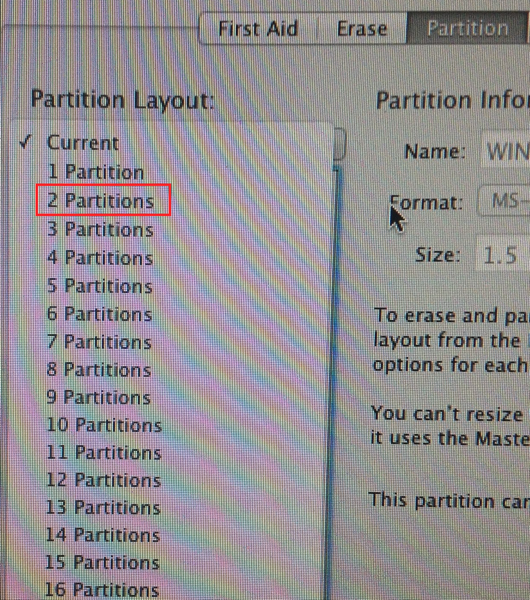
10. Now you will see two boxes of equal size. One is “Untitled 1” and the other is “Untitled 2”. Click on “Untitled 1” to highlight it with a blue border. You can do the same for “Untitled 2” later.

11. Change the names of the partitions to something you can remember. Change the size of the first partition to 100 GB to 200 GB. That’s plenty.

12. Change the format to Mac OS X Extended (Journaled) in both partitions from Windows FAT.

13. Most important! Go down to the “Options” box below the partitions, click on it to bring up a window and select “GUID” You don’t want Windows’s Master Boot Record.

14. All right! It’s time to install OS X on your OS X partition. Click on the “Partition” button and then on the “Apply” button and the process begins.

15. When you finish, you’ve got an external hard drive partitioned and ready to go.

16. Click on the Red exit button in the upper left-hand corner to leave Disk Utility.
17. You’re back at the main window. Carefully click on “Reinstall Mac OS X” to highlight it.

18. Click on the Continue button in the lower right-hand corner of the window.
19. Click on the Continue right-facing arrow.

20. You’ll get a message about verifying your computer’s eligibility with Apple. Click on Continue.

21. You get an installation software license agreement. Read it quickly and click on the right-facing Agree button

22. One more message. You have read and agreed to the Software License Agreement. If you didn’t make a backup before, make sure you have one on hand. You can’t sue Apple in case you lose your data!

23. Now you’re at the hard drive selection screen. You’ll notice that you can’t overwrite your pre-existing OS X 10.11 installation. You can only install 10.7 Lion on the new blank partitions you just created.

24. Now click on OS X Lion and click on the right-facing Install arrow.

25. Now you wait for the installation. Now is a good time to take a shower, do some laundry, or eat some food. You can’t do anything on your computer right now anyway.
It will take some time. First, you have to download the OS X installer and then you have to install OS X.


26. Now you go through the steps of setting up OS X. This is still the same, so I’ll let you consult the documentation that came with your Mac.

27. You’re at the desktop at last. A few more adjustments to make.
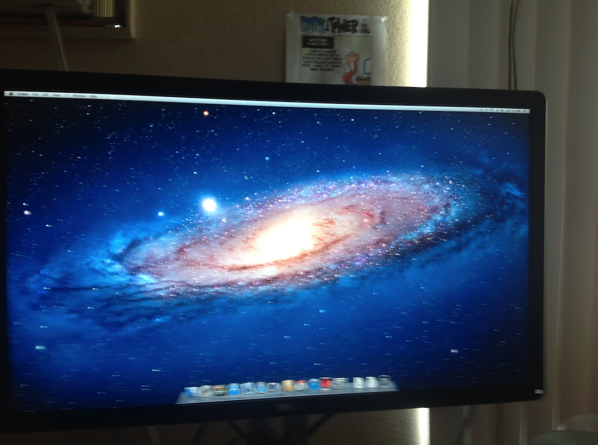
28. Go under the Finder’s Preferences (Not the System Preferences) and set the desktop to display all attached peripherals.

29. Plug in the USB floppy drive and insert a floppy disk to test it.
30. If everything went correctly, you’ll see the floppy disk icon on the screen. Click on it to open it in a Finder window and commence copying!
Saturday, May 28, 2016
Floppy Drive Access When your Mac runs on OS X 10.11 El Capitan-Scenario #3
Scenario #3: You made a bootable clone using Super-Duper or Carbon Copy Cloner of a pre-OS X 10.11 version of OS X. You’re in luck. Boot up from the clone.
1. Plug the USB external hard drive into a USB port. If you used a Firewire 400/800 drive to make the clone, use the Firewire port if your Mac has one.
2. See that the drive starts up, that the activity light flashes, and that the drive appears in the Finder’s sidebar.
3. Go to System Preferences. You want the Startup Disk system preference.
4. Select your external boot drive and click on Restart.
5. You’ve booted up with the older version of OS X that your Mac recognizes.
6. Plug in the external USB floppy drive and the external flash drive or USB hard drive.
7. Start copying the files!
Tom Briant
Editor, MacValley Blog
