The MacValley blog

Welcome to the MacValley blog, your first stop for all the latest MacValley news and views.
|
The MacValley blog Editor: Tom Briant
|
|

Thursday, December 19, 2013
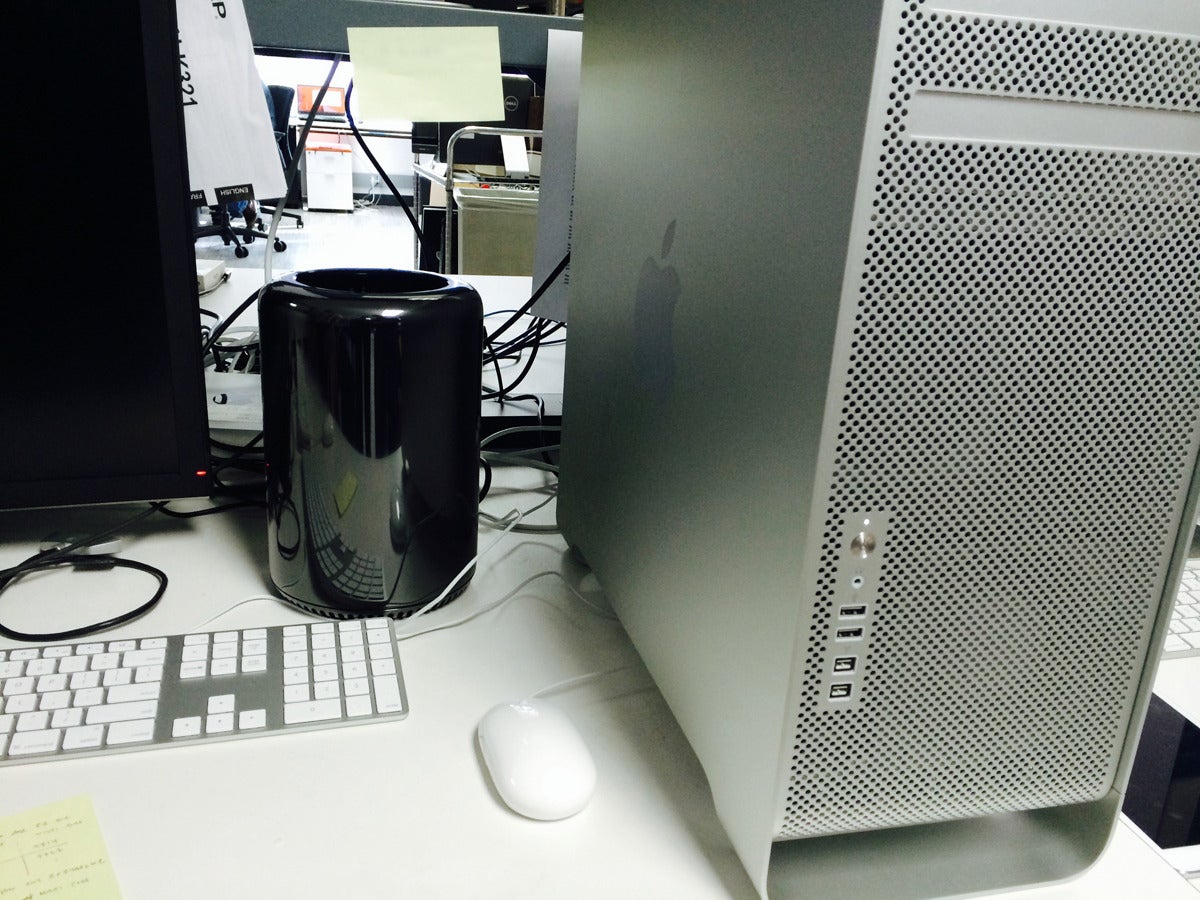
old-new-mac-pro-100220843-orig-100220845-orig.jpg 1,200×900 pixels
This is the new Mac Pro against the old Mac Pro in the Macworld Labs. Oooh, I like it, but that price! It’s more than I paid for my last car!
Tom Briant
Editor, MacValley Blog
old-new-mac-pro-100220843-orig-100220845-orig.jpg 1,200×900 pixels: ""
(Via.)


Sunday, December 15, 2013
Tinkertool-You should add the appropriate version to your toolbox of Utilities
My last post reviewed Intego Software’s Washing Machine utility package. I mentioned that it doesn’t do everything, such as alter your screenshot’s file format and file location. Well, here’s a utility to solve problems like this.
It’s a utility that doesn’t get publicized in mass e-mails or in Web pop-ups; but i heartily recommend it to you. It’s Marcel Bresink’s Tinkertool. What it does is put a graphic interface on hidden settings that Apple didn’t give you a graphic interface. According to Apple, you have to type in the defaults command followed by the parameter to alter into Terminal.
If you bought a Mac to get away from working at the Terminal, then you’ll appreciate Tinkertool. You download it from http://www.bresink.com/osx/0TinkerTool/download.php
It comes in a .dmg file. When you click on it, you get this warning:

Click on “Agree” and you get the Tinkertool 5.0 application, an HTML page with Frequently Asked Questions in English and a link back to the Web site for future reference.

When you drag and copy Tinkertool to either your Applications or Applications/Utilities folders, you click on it and get this window.

Look in the middle and you see how to change the screenshot file format and the target folder for screenshots. So if you have a series of projects and you want separate folders for each set of screenshots, now you can change them with ease. That’s under the General tab.
Under the Finder tab at the far left-hand side you can change whether to see otherwise hidden and system files that OS X normally hides from you. You can also set OS X to NOT save all those .DS files that crop up when you save a file on a Windows server .

Two final tricks. First, if you don’t want other windows open on your screen to distract you, you can use the Dock tab to set Single Appleication Mode:

Second, what if you move to another Mac and want to keep all these settings? Siimple, export a Tinkertool .ttps file


Summary:
Tinkertool, a free utility from Marcel Bresink Software, let you change many servings for your own user account that would otherwise require you to type in commands at the Terminal prompt. You can also import and export settings files from the same version of Tinkertool.
Tinkertool does not alter anything that Apple did not make available. You do not need to enter your user password to use Tinkertool. You will need to use it on each user’s account on a Mac. You have the option to import and export .ttps files that contain all your modifications.
Make sure to read the FAQ file included on the .dmg file that you download. If you use earlier versions of OS X, earlier than Mavericks, you will need to use versions specific to that operating system.
Tom Briant
Editor, MacValley Voice
Intego's Washing Machine simplifies keeping your Mac clean and tidy
Intego is not the first utility developer on any platform to use household appliances as a metaphor for what they accomplish. It is to Intego’s credit that they didn’t try to make this utility an “everything and the kitchen sink” utility
Requirements
Washing Machine requires at least a Core 2 Duo Intel processor, OS X 10.6, and 50 Mb of free disk space. It costs $29.95 for a single user license, $49.95 for a 2 user license, and $79.95 for a 5 user license. If you just use it yourself, you might want to look at the software bundles advertised on Macupdate.com, Macworld.com, and Maclife come for the opportunity to buy this and other utilities at a cheaper price.
What it is and isn't
Washing Machine has three main missions:
1. Reclaim disk space from the junk that has built up.
2. Track down duplicate files and eliminate them if you want to.
3. Organize your Desktop, your Dock, and your Smart Folders.
It doesn’t delve into various settings that Apple doesn’t provide a graphic interface for, such as setting the screenshot file format and file location. It doesn’t offer an option to set the User Library file to visible instead of hidden. It doesn’t repair permissions or your hard drive or defragment it. Too many utilities, (I’m looking at you Onyx) offer a plethora of features, but can confuse users with that plethora of choices.
You can try Washing Machine for free in evaluation mode for 30 days. You can do a dry run of each of the features, but it won’t affect your current settings. You have the option of buying a license at any point.
Reclaim Disk Space
Reclaim goes after those areas on your Mac that attract junk. Digital dust bunnies as it were.
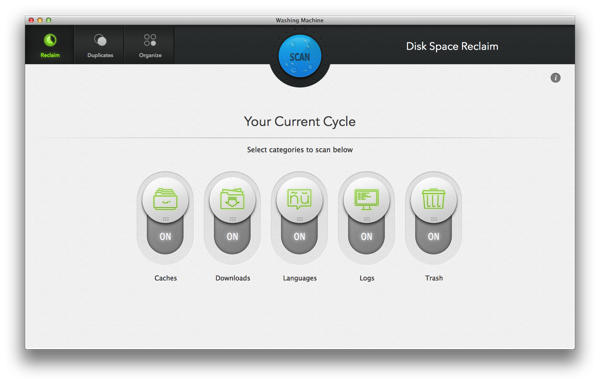
As you see from the picture, you select Reclaim, Duplicates, and Organize at the upper left-hand corner. The settings for the current operation are displayed below.
By default, Washing Maachine examines your Caches, your Downloads, your Languages, your Logs, and your Trash. You slide the buttons to deselect a category.
As Washing Machine analyzes your files, it displays the progress of the analysis on the right-hand side. On the left-hand side, it displays useful tips and inspiration quotes about the value of organization and cleanliness.
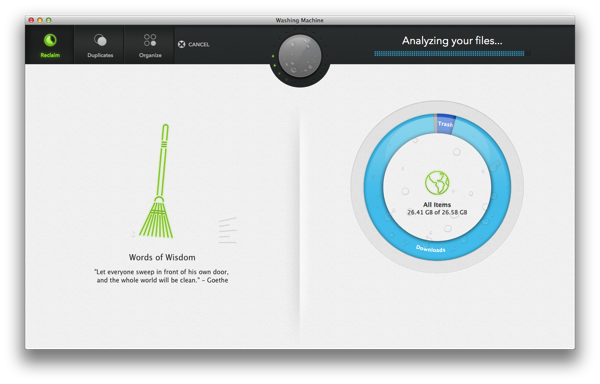
So click on the large blue SCAN button to begin the cycle. Intego does not indulge in gratuitous visual and audio effects to simulate a washing machine at this point, a point in their favor.
After it completes, it displays the examined areas on the left with a graph on the right. I would have preferred a a bar or pie graph myself. Below the graph you see a slider to set just how aggressively you want to attack your digital trash. In the evaluation mode, it’s set in the middle and you can’t change it.
You see a display of files to possibly delete in the form of a hierarchical tree Click on the boxes to decide whether to delete or retain individual files
Use the slider to select how aggressively you want to cleanse your Mac and click on the blue button in the middle at the top.

Duplicates
Duplicates lets you find duplicate files not just in your User folders, but on locally attached hard drives. That would include additional internal drives and external hard drives connected by USB, Firewire, and Thunderbolt. You can also manually add Network Attached Storage devices and any volumes within them.
It begins with you clicking on the Duplicates tab in the upper left-hand corner. You see six categories of files that attract duplicates.

Deselect any categories and select the Blue Scan Button.
Now you select which drives to examine. By default, your User folder is examined. If you want another user’s User Folder examined, you need to log out of your account and start up with their account.

Now on the left-hand side you can select the locally attached drives with just a click in the box. To add a Network Attached Storage device, you need to go to the “+” and “-“ buttons below the left-hand window. You get a File dialog box to select it. It takes a little effort, but you can do it. The right-hand side lets you select drives to exclude from your search.
I should warn you that the analysis of possible duplicate files takes a while. So be patient. Put on some good music.

When you finish, you will see a display of duplicate files on the left-hand side. Click on each title and the right-had side displays the individual files to delete. Click on the boxes to pick those to delete.

Organize
You can find other programs to reclaim lost space and find duplicate files. Washing Machine’s Organize feature, though, is a unique feature.
You organize three areas of your Mac
1. The Desktop area. I have seen too many users stuff their desktops full of files and folders until they can’t see what’s on it.
2. The Dock. This feature suggests the best set of apps to use, as you use these apps the most.
3. Smart Folders. Washing Machine offers you a set of preselected Smsart Fodlers. Smart Folders are part of the Searchlight technology first introduced way back in 10.4. They serve as saved searches for files. I would hope a future version of Washing Machine would help users set up their own Smart Folders in addition to these preselected ones.

You start by selecting the Organize tab on the upper-left hand corner. Below that you get to select the categories you want to organize.
Under the Desktop category you see the files and folders on your Desktop and “bins” you can move these files into.

I ‘m proud of my Desktop. I have only one file on it, an alias to my printer. Some of you, though, may not be.
Now the Dock features lets you organize your Dock in a more convenient manner than just dragging files from an open Finder windows to the Dock. So I give it points for convenience over the default Mac setup.

But Washing Machine reminds you if you are in Evaluation Mode that you need to purchase a license to actually make the changes.

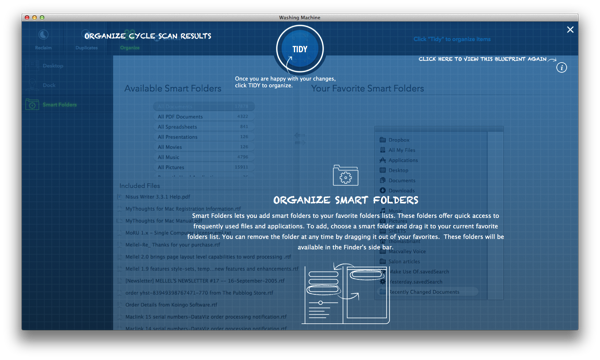
Smart Folders in Washing Machine are preassembled for you. You only need to drag them from the left-hand column to the right-hand column, where they will end up in your Finder’s Sidebar.
A word of caution. These Smart Folders do not search for iWorks formats (.pages, .numbers. and .keynote). They search for the Microsoft Office formats.

And if you want help at any time, just click on the encircled i in the upper right-hand corner. You will see an overlay resembling a blueprint explaining how to use a particular feature.
Summary
Washing Macine combines two features, Reclamation of wasted space and identification of duplicate files with their subsequent deletion, along with a new one, organization of the Desktop, the Dock, and installation of Smart Folders into your Finder’s sidebar to aid in organization.
I would say this app is intended for users who need a convenient way to clean up their Macs. Some operations such as setting up Smart Folders are made more convenient.
Depending on how stuffed your Mac is, you may need to dedicate a whole evening to this. Fortunately, the program is stable and did not crash on me while I ran it in evaluation mode.
If you think about buying this, check out Macupdate.com, macworld.com, and maclife.com to see if they have any bundle of software that include Washing Machine. You could save yourself some money and pick up another desirable program.
(All test and screenshots used the evaluation version of Washing Machine. The developer did not provide me with a free license to sway my opinion)
Tom Briant
Editor, MacValley Blog
Saturday, December 14, 2013
Deals: $120-$270 off MacBook Pros with CD/DVD drive; up to $570 off Retina closeout models
From Appleinsider.com, check out this article on getting areal on a MacBook Pro from an authorized reseller.
Deals: $120-$270 off MacBook Pros with CD/DVD drive; up to $570 off Retina closeout models: ""
(Via.)
Senior Correspondent Arnold Woodworth has the Saturday roundup for you
Apple Scores Legal Victory Over Samsung In South Korea
http://www.businessinsider.com/apple-samsung-legal-victory-2013-12
Why Apple Is Rejecting Bitcoin Apps
Apple is simply protecting itself from legal repercussions until regulators can come to some sort of consensus on how to treat the digital currency.
Bitcoin is not illegal, but it is also not legally recognized by governments as a currency. This gray area is what is leading Apple to reject Bitcoin-transaction apps.
http://www.businessinsider.com/why-apple-is-rejecting-bitcoin-apps-2013-12
11 Bitcoin Myths
http://www.zerohedge.com/news/2013-12-12/fact-fiction-and-11-bitcoin-myths
The Perfect Steve Ballmer Quote To Illustrate What Went Wrong At Microsoft
In the last five years, probably Apple has made more money than we have. But in the last 13 years, I bet we've made more money than almost anybody on the planet. And that, frankly, is a great source of pride to me.
Ballmer explains that from day one, his job at Microsoft was to think about money.
This is the problem with Ballmer and his run at Microsoft. His starting point for any decision at the company centers on money. He thinks about how Microsoft will make, or lose, money on a product.
http://www.businessinsider.com/steve-ballmer-interview-2013-12
Twitter quickly reverses policy on user blocking after backlash
Twitter quickly reversed a controversial policy on user blocking after a backlash over a system that would have let someone who was shut out by another to still be able to see that user's tweets.
The change, unveiled late Thursday, also would have meant that users who were blocked by others would know not that they've been blocked.
The policy purportedly was aimed to curb retaliation against users who blocked other users.
http://blogs.marketwatch.com/thetell/2013/12/13/twitter-quickly-reverses-policy-on-user-blocking-after-backlash/
5 Ways Hackers Get In And How To Stop Them
http://www.businessinsider.com/5-ways-hackers-get-in-and-how-to-stop-them-2013-12
Identity Theft Now Costs Far More Than All Other Property Crimes COMBINED
http://www.businessinsider.com/bureau-of-justice-statistics-identity-theft-report-2013-12
Saturday, December 7, 2013
Senior Correspondent Arnold Woodworth has a fresh crop of articles for us to read
Apple iPad is the Black Friday winner
http://blogs.marketwatch.com/behindthestorefront/2013/12/02/apples-ipad-is-the-black-friday-winner/
22 Ways Apple's iPad Video Mixes Fantasy and Reality
http://www.cio.com/slideshow/detail/131380/22-Ways-Apple-s-iPad-Video-Mixes-Fantasy-and-Reality
Apple's desktops overtake Dell as most sought-after PC for the holidays
for the first time ever, Apple's desktops have overtaken Dell to be the most sought-after PCs for the holiday shopping season
http://www.tuaw.com/2013/12/05/apples-desktops-overtake-tell-as-most-sought-after-pc-for-the-h/
In Apple vs. Samsung, the lawyers win
Apple said in a filing that it is seeking to recoup part of the more than $60 million in lawyer fees
http://www.marketwatch.com/story/in-apple-vs-samsung-the-lawyers-win-2013-12-06
Apple and its court-appointed e-books monitor
http://www.tuaw.com/2013/12/04/apple-and-its-court-appointed-ebooks-monitor/
Wall Street Journal slams judge in Apple e-book trial
the same judge who convicted Apple of violating anti-trust law a few months ago
This story might get a lot more interesting.
http://www.tuaw.com/2013/12/06/wsj-slams-judge-in-apple-ebook-trial/
http://live.wsj.com/video/opinion-breaking-up-the-big-bad-e-book-cartel-2013-12-06-141154531/E7F80257-84DC-4C47-960C-9F488624B9FE.html
Here's A Problem With The Theory That Android Is Taking Over The World
Apple's iOS, which powers iPhones and iPads, is destroying Google's Android in mobile shopping on Thanksgiving and Black Friday.
There's a jaw-dropping gap in usage between the two platforms. It suggests that the focus on smartphone market share misses a bigger picture about how the platforms are actually used.
http://www.businessinsider.com/ios-android-shopping-traffic-2013-11
What’s up with bitcoin hate?
http://blogs.marketwatch.com/cody/2013/12/04/whats-up-with-bitcoin-hate/
2 Million More Passwords For Facebook, Google, Twitter, Other Sites Were Stolen And Posted To The Net
http://www.businessinsider.com/2-million-more-passwords-stolen-2013-12
Here Are The 20 Worst Passwords You Can Use
http://www.businessinsider.com/the-worst-passwords-to-use-2013-12
What to do when internet fraudsters use your credit card
It can take up to eight months to set things straight
http://www.marketwatch.com/story/what-to-do-when-fraudsters-use-your-credit-card-2013-12-06
Sunday, December 1, 2013
Dave Barry’s Gift Guide - Dave Barry - MiamiHerald.com
Dave Barry’s Gift Guide - Dave Barry - MiamiHerald.com: ""
(Via.)
Good Morning, All. Hope you have finished the Thanksgiving holiday in good order. A special shout-out to our friends celebrating Hanukkah.
Above you see a link to Dave Barry’s guide to Holiday Gift Giving. Please, take a look at this. You need a good laugh.
Happy Shopping Season to all of us. Be ready to walk. You need to exercise from the back parking lot to the mall.
Tom Briant
Editor, MacValley Blog